Showing posts with label 1. Show all posts

Tuesday, March 14, 2017

Multi Commander 6 9 1 2306

Multi Commander 6 9 1 2306


Multi Commander

Multi Commander adalah manajer file yang lengkap dan memberikan anda berbagai kemudahan dalam mengelola file-file dan melakukan berbagai pekerjaan terkait dengan manajemen file.

Mengatur banyak file di komputer menggunakan Windows Explorer bukanlah pekerjaan yang mudah. Hal ini karena masih minimnya fitur yang dimiliki oleh file manager bawaan Windows tersebut. Ditambah lagi dengan jumlah panel Windows Explorer yang hanya ada satu.semakin menyulitkan ketika ingin mengatur file di beberapa folder yang berbeda.
Multi Commander memiliki semua fitur yang anda butuhkan dalam pekerjaan sehari-hari yang terkait dengan file dan manajemen file untuk membuat pekerjaan anda menjadi lebih cepat dan lebih efisien sehingga anda dapat menghemat waktu.
Aplikasi ini memiliki semua fitur standar seperti fasilitas yang dimiliki oleh file manager seperti menyalin/copy, memindahkan/move file, mengubah/rename file, melihat/view file.
Selain fitur-fitur di atas, Multi Commander juga mempunyai berbagai fitur khusus yang memungkinkan Anda untuk melakukan tugas yang lebih berat terkait dengan manajemen file dengan cara yang mudah. Seperti pekerjaan Auto-unpacking/mengekstrak, Auto-sorting/penyortiran secara otomatis, Menelusuri isi file archives, registry dan FTP, Mencari/search file, melihat isi file dan gambar dan juga dukungan Scripting yang memudahkan anda dalam mengotomatisai berbagai tugas. Dan memungkinkan anda untuk melakukan semua hal dari keyboard menggunakan shortcut sehingga anda dapat bekerja cepat dan efisien.
LisensiFreeware
DeveloperMathias Svensson
Sistem Operasi  Windows XP/Vista/7/8/10
File :[32-bit] (6.60MB) [64-bit] (7.25MB)
Link Download 32 bitClick ? Download
Link Download 64 bitClick ? Download
VersionMulti Commander 6.9.1.2306

Available link for download

Read more »

TinyWall 2 1 8

TinyWall 2 1 8


TinyWall

TinyWall adalah aplikasi yang mengemulasi add-on yang memberikan perlindungan lewat firewall dengan fasilitas melalui opsi konfigurasi yang tidak memerlukan pop-up konstan atau pengaturan yang rumit.

TinyWall dilengkapi dengan built-in rule yang secara default akan memblokir koneksi yang masuk atau keluar, dalam hal ini upload dan download data. Anda dapat menggunakan fitur Whitelist aplikasi secara manual, yang memungkinkan Anda menggunakan modus study yang akan membiarkan semua lalu lintas berjalan secara otomatis.
Aplikasi Firewall ini juga dilengkapi dengan opsi untuk membuka blokir semua lalu lintas LAN, yang akan membatasi lalu lintas internet yang masuk dan keluar sesuai dengan pengaturan Anda.
Fitur lain termasuk pilihan untuk melindungi pengaturan password, mendeteksi gangguan yang mengancam, blok semua malware yang terintegrasi, while except, dukungan IPv6, dan banyak lagi.
Unblock semua lalu lintas jaringan lokal. Fitur ini dapat sangat berguna jika Anda memiliki banyak aplikasi komunikasi di rumah atau jaringan kantor.

TinyWall memiliki 5 mode perlindungan Firewall :
1.Normal protection: Memproteksi komputer secara biasa seperti Windows Firewall.
2.Block All: Kamu tidak dapat menggunakan internet dan laptop/komputer tidak dapat mengakses internet.
3.Allow Outgoing: Komputer hanya bisa mengirim data ke Internet, tapi komputer tak dapat menerima data dari internet menuju komputer kita.
4.Disable Firewall: Firewall akan dimatikan secara otomatis.
5.AutoLearn: TinyWall akan menyesuaikan pengamanan dengan sendirinya.
LisensiFreeware
DeveloperKároly Pados
Sistem Operasi  Windows XP/Vista/7/8/10
File :(1.14MB)
Link Downloadhttp://tinywall.pados.hu/files/TinyWallInstaller.msi
VersionTinyWall

Available link for download

Read more »

Coolutils Total CSV Converter 3 1 165 Multilingual Full Serial

Coolutils Total CSV Converter 3 1 165 Multilingual Full Serial


Total CSV Converter is a reliable tool for converting CSV and TSV files to DOC, PDF, HTML, TXT, XLS, DBF, XML, JSON and a variety of OpenOffice formats. The program was designed to be convenient and user-friendly. Loaded with helpful customization options, the Total CSV COnverter doesnt just convert your files to a different format, it lets you make improvements along the way.

Coolutils Total CSV Converter 3.1.161 Multilingual Full Serial

For example, with the Total CSV Converter youll also be able to:
Convert large volumes of CSV files fast and with minimal effort.
Set your own delimiters or skip the rows you dont need.
The option saving feature lets you save the settings of jobs that are frequently performed for faster implementation.

With its clear, intuitive interface the Total CSV Converter is accessible to users of every skill level. For beginners, weve included a helpful onboard wizard that assists with locating files and setting up new jobs through an easy to use GUI. For advanced users weve included support for handling conversion via the command line.

HOMEPAGE

DOWNLOAD LINK
Coolutils Total CSV Converter 3.1.165

MIRROR
 Coolutils Total CSV Converter 3.1.165

Available link for download

Read more »

SONY Xperia J Version 4 1 2 ST26i flash file download

SONY Xperia J Version 4 1 2 ST26i flash file download


SONY Xperia J (Version 4.1.2) ST26i Free Flash File
Download Here

Available link for download

Read more »

Monday, March 13, 2017

J500GXXU1AOG4 Android 5 1 1 XXU1AOG4 Firmware for Galaxy J5 SM J500G flash file

J500GXXU1AOG4 Android 5 1 1 XXU1AOG4 Firmware for Galaxy J5 SM J500G flash file


samsung Galaxy J5 SM-J500G flash file download

J500GXXU1AOG4: Android 5.1.1 XXU1AOG4 Firmware is now available at Android Officer. Samsung rolled out the XXU1AOG4 5.1.1 Lollipop official firmware update for Galaxy J5 SM-J500G. The firmware update recently out by Samsung and the users can manually download J500GXXU1AOG4 to update their device. The users can also update their device to this new firmware through Samsung Kies or OTA (Over the Air). It is always recommended to update your device with the latest firmware whenever Samsung rolled out as with every update Samsung introduces fixes for bugs (if any), improve/enhance overall performance in OS and sometime introduces new features. Here at AndroidOfficer, you’ll find both official and manual way to update this latest firmware on your Samsung SM-J500G. Scroll through this page to learn how to install stock J500GXXU1AOG4 Android 5.1.1 Lollipop firmware on Galaxy J5 SM-J500G. However, flashing or installing official firmware restore device kernel, so root access to your device will be void, means the firmware update will unroot your device (if it was rooted). 

There are two official ways to update the J500GXXU1AOG4 Android 5.1.1 Lollipop stock firmware, OTA and KIES. However, if you unable to update your device through OTA and Kies, then you can flash stock firmware manually through Odin. AndroidOfficer always recommend you to try official ways (OTA or KIES) first and if official method don’t work then try manual method to flash the stock firmware.

J500GXXU1AOG4 Android 5.1.1 Firmware Details:

Device: Samsung Galaxy J5
Model: SM-J500G
Version: Android 5.1.1 Lollipop
PDA: J500GXXU1AOG4

Samsung Galaxy J5 SM-J500G

Warning!

The firmware is released only for the Samsung Galaxy J5 SM-J500G. So, don’t try this tutorial on any other Android device and also the tutorial is based on Windows PC. AndroidOfficer is not responsible If anything wrong happens to your device after following this guide, try this at your own risk. However, we believe that if you follow the instructions carefully that mentioned in this guide, your device shouldn’t face any issue.

Pre Requisites:

Before proceeding to update guide, AndroidOfficer recommend to backup all your device data and settings to restore later when you need that. However, official firmware restore all previous data but if your device get stuck at bootloop issue or fall into any error, the backup file will help you to restore all your data.
  1. Check your device battery percentage, make sure that your device have at least 60% battery power (How to Check Battery Percentage on Android Devices)
  2. Backup all your device data and settings to external storage- (How to Backup Android Data and Settings)
  3. Check that USB Debugging is Enabled on your device, otherwise it is not possible to connect and transfer files between PC and Galaxy J5 SM-J500G via USB- (How to Enable/Disable USB Debugging on Android Devices)
  4. Install USB Driver for Galaxy J5 SM-J500G on your PC (Download USB Driver) 
Note That:
  • If your Galaxy J5 SM-J500G have any Custom ROM installed such as- CyanogenMod ROM, ParanoidAndroid ROM, AOKP ROM, SLIM ROM, PACman ROM, Avatar ROM, Omni ROM, LiquidSmooth ROM, Beanstalk ROM, Carbon ROM etc, then it’ll be replaced by stock firmware.
  • Custom Recovery such as ClockWorkMod Recovery (CWM) or TWRP or Philz Recovery will be replaced by Stock Recovery.

How to Install/Update Official Firmware on Galaxy J5 SM-J500G via OTA (Over the Air):

  1. Turn on Internet connection on your device (should have stable Internet connection)
  2. Go to Settings>>About, and tap on the Update Option from there (If its show “The latest update have already been installed” message, then your device haven’t receive any OTA yet, check back later or try installing through Kies.)
  3. Tap OK to start the download and installation process
  4. Once done, your device will reboot automatically

How to Install/Update Official Firmware on Galaxy J5 SM-J500G via Samsung Kies:

  1. Turn on Internet connection on your device (should have stable Internet connection)
  2. Download and Install Samsung Kies Utility on your PC
  3. Connect your device to PC through USB
  4. Open/Run Samsung Kies, it should automatically detect your device
  5. At the Samsung Kies home screen, you’ll see New Firmware Upgrade is available notification (If it show- “This is the last firmware”, then your device haven’t received the latest firmware on Kies, check back later or try flashing manually through Odin)
  6. Click on the Firmware Upgrade button to start the update process
  7. Follow onscreen instructions
  8. Once done, your device will be reboot automatically
  9. After reboot, you can disconnect your device from PC 
If both the above official way don’t work for you, then download firmware from the below list and follow the manual installation guide as it is.

Download J500GXXU1AOG4 Android 5.1.1 Lollipop Firmware

Note that: you can flash/install any firmware from the below list if the firmware for your country is not available, except those firmware comes with their carrier name.

Cambodia: J500GXXU1AOG4_J500GOLB1AOG5_CAM

Philippines (Globe): J500GXXU1AOG4_J500GOLB1AOG5_GLB 

Philippines (Smart): J500GXXU1AOG4_J500GOLB1AOG5_SMA 

Malaysia: J500GXXU1AOG4_J500GOLB1AOG5_XME 

Indonesia: J500GXXU1AOG4_J500GOLB1AOG5_XSE
[P.S- The list will be updated with rest of the countries/carrier when respective firmware will release]
odin-3.09-home-screen

How to Install/Update Official Firmware on Galaxy J5 SM-J500G Manually through Odin:

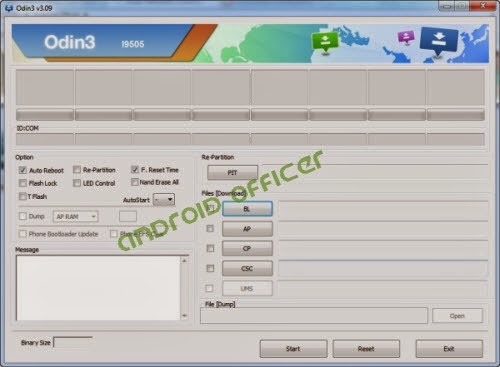
  1. Download firmware from the above list and extract the zip file, you should get .tar.md5 file along with few other files.
  2. Download Odin v3.09 and extract the zip file, you should get Odin v3.09.exe file along with other files.
  3. Now Open/Run Odin v3.09.exe file as an administrator (to open program with admin privilege, right click on the Odin v3.09.exe file and click on the “Run as administrator” from the context menu, this is applicable only on Windows Vista, Windows 7 or higher PC)
  4. Switch off and boot Galaxy J5 J500G into Download Mode by pressing and holding the Volume Down+Home+Power buttons together (long press until the boot screen appear). A warning message will flash, now press Volume Up key to proceed to Download Mode.
  5. Now connect your Galaxy J5 J500G to your PC via USB cable
  6. In Odin screen, you should see a COM Port number like “0:[COM7]” at ID:COM section and “Added!” text at the message box. This means your device has been successfully detected by Odin. (If not, then try connecting through another USB port. If you are using desktop PC, use USB port located at the back of the CPU. If still don’t work, then you should reinstall the USB driver and try again)
  7. Make sure that, only the “Auto Reboot” and “F. Reset Time”options are checked in Odin screen.
  8. Now, click on the AP button and select the .tar.md5 file that you get by extracting the firmware zip file in step 1.
  9. Now, click on the Start button to begin the installation process, and wait few moments.
  10. Once completed, you would see “PASS!” message in ID:COM port having green background
  11. Your phone should automatically reboot after completion
  12. You can now disconnect/unplug your phone from computer
Congrats! your Galaxy J5 SM-J500G now updated to the J500GXXU1AOG4 Android 5.1.1 Lollipop stock firmware. Now, go to Settings>>About, and verify the firmware update.

How to Fix Bootloop on Galaxy J5 SM-J500G

If anything goes wrong, your device may stuck at booting animation. If your Galaxy J5 SM-J500G stuck at boot animation screen for more than 10 minutes, then follow these instructions:
  • Go to Recovery Mode by pressing and holding the Volume Up+Home+Power buttons together.
  • Now, perform Wipe Data/Factory Reset and Wipe Cache Partition task before selecting the reboot system now option. In Recovery Mode use the Volume keys to navigate between options and Power key to select any option.
Note that: Wipe task process will erase all your device internal memory data but not the external SD card data.

Available link for download

Read more »

Unit Converter Pro v2 1 01 APK Latest

Unit Converter Pro v2 1 01 APK Latest


Powerful, robust and beautiful converter tool. Supports more than 650 units from 35 different categories, and growing.

Simple and easy-to-use unit converter to handle any conversion you may need. With one of the largest collection of 800 units and currencies and unlimited custom conversions, it is perfect for work, engineering, school as math helper, shopping, travelling or in the kitchen.

 Features: 
- No Ads
- Create unlimited own conversions
- Easy to use with intuitive interface
- Support for landscape modes on tablets and phones
- Optimized for large screens, showing results for all conversions from the same category on the main screen
- Light and dark themes
- Instant display of results while typing, no need to choose between different units
- Built-in search, finding required units instantly
- Built-in calculator
- Over 140 currency exchange rates from European Central Bank, Yahoo Finance and others.
- Unlimited favorite conversions
- History of the last 20 conversions
- Share results by mail and possibility to copy to clipboard for later use
- Supported languages: English, Portuguese, Russian, Spanish and Ukrainian.

This intuitive and simple application is very useful when you are traveling abroad with its currency rates and clothing measurements, for school with a lot of categories from basic ones, such as length, volume, mass, temperature to more advanced in mechanics, energy, photometry, radioactivity etc., and just for discovering something new.

We also introduced custom conversions. Now you can create and manage your own conversions and compare whenever needed: country area size, food calories, etc.

* Supported list, all with metric to imperial and imperial to metric conversions.
- Basic dimension: length (distance), area, volume.
- For daily use: currency converter (European Central Bank, Yahoo, Russian Central Bank, National Bank of Ukraine), clothes and shoe sizes for men, women and children, cooking weight, fuel consumption and time.
- Mechanics: pressure, weight, force, torque.
- Motion: speed, acceleration, angular speed, flow rate.
- Chemistry: density, dynamic and kinematic viscosity, mineralization.
- Computing: data storage and data transfer.
- Energy: power, temperature conversions (Celsius, Fahrenheit), consumed energy.
- Electricity: electric charge, electric current, electric capacitance, electric potential, electric resistance.
- Photometry: luminescence, illuminance.
- Radioactivity: radiation, radioactivity.
- Misc: magnetic field, numbers, roman numerals, fractions, astronomy distances.


Download Unit Converter Pro v2.1.01 APK

This Post is Protected by Wanem Club © Copyright 2016-2017, All Rights Reserved.

Available link for download

Read more »

Movavi Video Editor 12 1 0 Multilingual Full Patch

Movavi Video Editor 12 1 0 Multilingual Full Patch


Movavi Video Editor is a powerful yet easy-to-use video processing program for Windows. Cut and join video clips with zero quality loss, apply stylish video effects and filters, add music, titles, and much more! Despite its extensive functionality, Movavi’s video editing software is very easy to work with: take a pinch of fantasy, mix it with some free time, and you’ll have a Hollywood-like video with a lot less effort. Download the program, review the information on this page - and your path to fame has for sure begun!

Step 1. Upload Multimedia Files
- Transfer recordings from photo or video camera to your computer
- Capture webcam footage, record your voice via microphone
- Upload video and audio files in any popular format: AVI, MOV, MP4, MP3, WMA, and many others
- Digitize video from VHS tapes, TV tuners, and other analog devices
- Add photos or any other graphic files

Step 2. Cut Unnecessary Parts. Join Fragments
- Slice your video into as many segments as you want
- Delete unwanted parts with a couple of clicks
- Join individual pictures or video passages with stylish transitions

Step 3. Experiment with Filters and Special Effects
- 40+ special effects are included to whet your creative appetite! Want to see the entire collection? Click the More Effects button.

Step 4. Apply Titles
- Choose from more than 100 fonts
- Experiment with word art
- Set color, size, and other text parameters
- Add shadow effects to characters
- Create stylish text backgrounds
- Rotate captions in any direction
- Make text animations and much more!

Step 5. Add Music. Record Voiceover
- Upload background music and sound effects in MP3, WMA, or any other popular formats
- Record voiceover using your microphone
- Capture sound from an MIDI-keyboard, electric piano, or other musical instruments connected to your computer

Step 6. Save Video in Convenient Format
- Save video clips in popular video and audio formats to play on your computer
- Use intelligent output presets for viewing on smart phones, tablets, and other mobile devices
- Burn your movies to DVD
- Share your videos on YouTube, Facebook, or Vimeo. Upload files to FTP or Amazon cloud storage

Other Features:
- Simply add your images to the program and drag them into the working area! The program will automatically add appropriate transitions, so all you need to do is overlay an appropriate soundtrack and write some words for titles to make your picture show ready for prime time!
- Choose from more than 20 stylish transitions to smooth the flow between video clips.
- Capture high-quality visuals and save them in any convenient image format
- Edit video with no delays thanks to support for Intel® HD Graphics and NVIDIA® CUDATM technologies!

HOMEPAGE

DOWNLOAD LINK
 Movavi Video Editor 12.1.0 Multilingual

MIRROR


 Movavi Video Editor 12.1.0 Multilingual

Available link for download

Read more »

Sunday, March 12, 2017

Parallel Space Pro v3 1 6439 Android

Parallel Space Pro v3 1 6439 Android


Clone and run multi accounts of a same app e.g WhatsApp simultaneously and apply custom themes to cloned apps!
As one of the top-ranked tool on Android, Parallel Space helps more than 50 million users log in to their multi accounts at the same time on one device by cloning! It also protects user privacy by making apps invisible on device with the Incognito Installation feature. Moreover, users are able to customize their cloned apps in Parallel Space with themes to create their own stylish launcher. So far Parallel Space has supported 24 languages. Get Parallel Space now to manage your multi accounts on one device, protect privacy and create your customized space!

Log in to multi accounts of social networking apps or game apps at the same time on one device
  •  Balance between users’ life and work easily.
  •  Double users’ online gaming experience and have more fun.
  •  Almost all apps are supported for a second account in Parallel Space. Data from both accounts won’t interfere with each other.
Switch fast between accounts with just one tap
  •  Run two accounts simultaneously and switch between them fast with one tap to effective manage different accounts.
Download link:
http://www57.zippyshare.com/v/Rzx71RhJ/file.html
Softek Systems™
Enjoy!

Available link for download

Read more »

PCMAV 10 1 7

PCMAV 10 1 7


PCMAV

PCMAV adalah salah satu antivirus buatan Indonesia yang cukup populer dan terbukti ampuh dalam membasmi berbagai macam jenis virus Lokal, Worm dan variannya.

Selain menggunakan engine antivirus-nya sendiri, PCMAV 10 juga dapat menggunakan engine dari ClamAV sebagai plug-in untuk memperkuat hasil pendeteksian hingga 800.000 virus lebih. Tim engineer PCMAV pun secara meyakinkan berhasil menemukan dan mengembangkan sendiri berbagai teknologi antivirus terbaru nan-handal untuk mengatasi dan menjaga sistem Anda dari gangguan virus komputer.

Beberapa fitur Antivirus PCMAV :
1.Real-time Protection : Fitur canggih yang dapat mencegah malware aktif pada memory. Meskipun tanpa perlu melakukan proses scan secara manual.
2.Blok Program on USB/Card : Untuk yang tidak ingin kecolongan malware yang aktif dari USB flash disk/card (seperti di lingkungan perkantoran), gunakanlah fitur untuk mencegah malware yang belum dikenali.
3.AntiKeylogger : Fitur yang dapat Mencegat secara real-time perekaman tekanan tombol keyboard yang dilakukan oleh sebagian besar program keylogger yang banyak beredar saat ini
4.Link Protector : Fitur yang dapat memberikan perlindungan pengguna saat berinternet. Mampu mencegah website berbahaya yang memiliki potensi menyebarkan malware hingga tindakan phising.
5.Update Otomatis : Untuk memperbaharui file database dengan cara klik tombol Update pada menu.
LisensiFreeware
DeveloperPCMEDIA Antivirus
Sistem Operasi  Windows XP/Vista/7/8/10
File :Click ? Download
Link DownloadHirensBootCd
VersionPCMAV 10.1.7

Available link for download

Read more »

Saturday, March 11, 2017

Daum PotPlayer 1 6 63891

Daum PotPlayer 1 6 63891


Daum PotPlayer

Daum PotPlayer merupakan multimedia player yang sangat ringan untuk Windows.Mendukung hampir semua format video yang tersedia. PotPlayer berisi codec internal dan tidak perlu menginstal codec secara manual.

Tampilannya yang menarik di dominasi warna hitam metalic yang lebih nyaman serta dukungan media yang sangat lengkap.
Selain itu software pemutar video ini memiliki desain yang stylish dan trendi yang tentu saja akan menarik para user. Tetapi bagi kita yang penting tool ini mempunyai fungsi dan kemudahan yang sangat lengkap, sederhana, user-friendly dengan berbagai pengaturan Daum PotPlayer. Pengguna aplikasi ini memiliki akses untuk untuk mengambil screenshot dari video yang dipecah menjadi frame, merekam suara dalam berkas terpisah dan banyak fitur lainnya. Ada juga pilihan untuk mengaktifkan efek visual saat memutar file audio, dan juga untuk memasukkan teks. Anda juga dapat mengubah tampilan pemutar. Dan pengaturan tambahan yang cukup banyak, akan secara signifikan meningkatkan kualitas mendengarkan media audio.

Fitur utama dari Daum PotPlayer:
1.Dukungan untuk seluruh format audio / video.
2.Video codec internal DXVA (H.264/AVC, VC-1, MPEG2) dan EVR (Windows 7/8).
3.Kualitas gambar dan suara yang jernih
4.Mendukung semua jenis subtitle.
5.Skins, logo, warna tema.
6.Support untuk TV perangkat digital dan Siaran live.
7.Penggunaan Recource CPU yang rendah
LisensiFreeware
DeveloperDVB Support
Sistem Operasi  Windows XP/Vista/7/8/10
File :[32-bit] (19.73MB) [64-bit] (20.59MB)
Link Download 32 bithttp://get.daum.net/PotPlayer/v3/PotPlayerSetup.exe
Link Download 64 bithttp://get.daum.net/PotPlayer64/v3/PotPlayerSetup64.exe
VersionDaum PotPlayer 1.6.63891

Available link for download

Read more »

Freemake Audio Converter 1 1 8 9

Freemake Audio Converter 1 1 8 9


Freemake Audio Converter

Freemake Audio Converter adalah aplikasi konversi audio gratis yang memiliki fungsi untuk melakukan konversi tipe file audio ke MP3, OGG, FLAC, WAV, WMA, AAC, M4A dan beberapa format lainnya.

Freemake Audio Converter ini mampu melakukan konversi file audio secara cepat dalam jumlah banyak (batch mode).
Aplikasi ini mampu mengkonversi MP3, WMA, WAV, FLAC, AAC, M4A, OGG, agar sesuai dengan MP3 player, iPod, iPhone, iPad, PSP, mengekstrak audio dari file video kamu, juga memiliki fitur untuk menggabungkan file audio!
Anda pun juga dapat mengatur kualitas dari file audio tersebut sesuai keinginan. Guna melengkapi kemampuan aplikasi ini, ditambahkan pula fitur share Facebook, Twitter, dan Youtube.
Audio Converter ini merupakan software yang dapat anda gunakan untuk mengubah atau mengkonversi format file audio menjadi berbagai format audio yang anda inginkan.
Dengan dukungan berbagai file audio seperti MP3, WMA, WAV, FLAC, AAC, M4A, OGG maupun lainnya menjadikan Freemake Audio Converter sebuah pilihan yang menarik untuk anda gunakan untuk mengkonversi berbagai format file audio. Tertarik menggunakan Freemake Audio Converter atau ingin menambah koleksi software converter anda, silahkan download softwarenya melalui link dibawah ini.
LisensiFreeware
DeveloperEllora Assets Corporation
Sistem Operasi  Windows XP/Vista/7/8/10
File :(18.12MB)
Link DownloadClick ? Download
VersionFreemake Audio Converter 1.1.8.9

Available link for download

Read more »

µTorrent 2 2 1 build 25302 Portable by Dave Green

µTorrent 2 2 1 build 25302 Portable by Dave Green


uTorrent Portable

uTorrent Portable | 1.6 MB

uTorrent adalah sebuah aplikasi yang biasa digunakan untuk mendownload file torrent dan magnet link. uTorrent ini bisa digunakan melalui jaringan P2P. uTorrent menjadi sebuah aplikasi favorit karena ukurannya yang mini dan penggunaan RAM yang sedikit. Namun, ada 1 hal yang jadi kekurangan dari uTorrent, yaitu saat installasi terlalu banyak "aplikasi sampah" yang terdapat diinstallernya, selain itu versi terbaru dari uTorrent sudah terlalu banyak dijejali iklan-iklan.

uTorrent yang saya bagikan ini merupakan versi lama uTorrent 2.2.1 dengan tidak dijejali iklan dan aplikasi sampah. Selain itu uTorrent ini bersifat portable, kalian bisa ekstrak dimana saja ( termasuk FlashDrive ) --> langsung jalankan melalui uTorrentPortable.exe

uTorrent Portable juga bisa dijalankan di Windows XP hingga Windows 10 versi terbaru baik 32-bit dan 64-bit :)

Homepage : http://www.utorrent.com/

Credits : Dave Green from HandyPAF

DOWNLOAD DISINI

NO PASSWORD !

Available link for download

Read more »

Atom 1 13

Atom 1 13


Atom Text Editor

Atom Text Editor | 90 MB

Atom adalah sebuah teks editor berbasis open-source dan gratis digunakan. Teks Editor dari Atom bisa digunakan sebagai alternatif dari notepad yang memiliki banyak kekurangan. Atom Teks Editor mempunyai berbagai macam kelebihan diantaranya support berbagai macam bahasa pemrograman, ringan digunakan dan dapat dijalankan di berbagai macam sistem operasi yakni Windows 7, Windows 8/8.1, Windows 10, Linux hingga Mac OS X

Jika kalian suka mengkoding program, tidak ada salahnya mencoba teks editor dari Atom. Tampilan Atom juga sangat intuitif serta menarik untuk dilihat dan didukung dengan berbagai macam tema yang bisa didownload :)

Kalian juga bisa mendownload versi portable dari Atom disini, versi Portable tidak butuh installasi dan dapat dijalankan langsung melalui flashdrive.

Homepage : https://atom.io/

SCREENSHOTS

Atom Text Editor

Atom Text Editor

DOWNLOAD DISINI

NO ADFLY, NO BINBOX, NO PASSWORD

Available link for download

Read more »

Friday, March 10, 2017

SynthFont 1 723

SynthFont 1 723


SynthFont

SynthFont adalah software untuk mengedit dan memainkan file midi menggunakan file sumber suara seperti soundfonts, file GigaSampler, file SFZ dan masih banyak lagi lainnya.

File midi berbeda dengan file audio, misalnya mp3, karena di dalam midi tidak berisi data audio, melainkan hanya berupa kumpulan not dan perintah untuk memainkannya.
Synthfont menggabungkan data midi dan data audio di dalam soundfont untuk menghasilkan (render) versi audio dari lagu.
Dengan ukuran filenya yang relatif kecil, Software ini bisa dibilang mempunyai kemampuan yang cukup handal dibandingkan dengan software serupa di kelasnya. Dengan berbagai fitur yang tersedia, Program ini hadir dalam bentuk penataan menu yang sederhana dan mudah untuk dioperasikan.
Mendukung penggunaan kedua efek VST dan instrumen. SynthFont memiliki beberapa kemampuan SoundFont pengeditan dasar dan juga menunjukkan data MIDI dalam Piano.

Kelebihan SynthFont :
1.Membuat sampai 32 track midi dengan editor berbentuk piano roll yang mudah, simpel dan user friendly.
2.Memasukkan suara instrument dari file Soundfont maupun sound file dalam format lainnya. Kamu juga bisa menyetting dan mengedit soundfont. Bahkan anda bisa membuat soundfont kamu sendiri (terlebih dahulu harus menginstall Viena).
3.Menggunakan vst instrument sebagai alternatif lain dari soundfont.
4.Menggunakan beberapa vst effect untuk menambahkan berbagai efek audio.
5.Merender aransemen musik kamu ke dalam beberapa format file audio, yaitu: wav, mp3, ogg, flac, ape, dan wma.
LisensiFreeware
DeveloperBohoohoofi
Sistem Operasi  Windows XP/Vista/7/8/10
File :(7.13MB)
Link Downloadhttp://www.synthfont.com/SynthFontSetup.exe
VersionSynthFont 1.723

Available link for download

Read more »

Thursday, March 9, 2017

R Tools R Drive Image 6 1 6102 Multilingual

R Tools R Drive Image 6 1 6102 Multilingual


R-Drive Image

R-Drive Image | 109 MB

R-Drive Image adalah software Backup & Recovery yang sangat berguna untuk membackup Sistem Operasi atau partisi hardisk. Dengan teknologi Byte-by-byte copy, R-Drive Image akan sangat membantu kalian saat Sistem Operasi kalian rusak / error / tidak bisa booting / terkena virus dan permasalahan lainnya, tinggal kalian restore saja file Image yang sudah dibackup menggunakan R-Drive Image

Berikut adalah beberapa fitur menari dari R-Drive Image : 

- Tampilan yang User-Friendly dan sangat mudah digunakan.
- Bisa langsung membackup Windows tanpa harus restart ( on-the-fly backup & restore ). 
- Backup File Image sudah dikompresi sekecil mungkin guna menghemat ruang penyimpanan.
- Support media removable baik FlashDrive / Hard Disk External maupun SSD hingga CD/DVD.
- Support USB IDE 2.0 / 3.0.
- Support partisi MBR ataupun GPT.
- Support UEFI untuk PC yang sudah support mode UEFI.
- Dan masih banyak lagi.

R-Drive Image juga support berbagai macam OS mulai dari Windows 2000/XP/Vista/7/8/8.1 hingga Windows 10 baik 32-bit ataupun 64-bit.

 Homepage : http://www.drive-image.com/

DOWNLOAD DISINI

PASSWORD RAR : www.software182.com

Available link for download

Read more »

Wednesday, March 8, 2017

Kingoroot v3 1

Kingoroot v3 1


Apps : Kingoroot
Version : 3.1
Size : 1.7 MB
OS : Android
Special OS : 4.4.2
Function : Root Android


Available link for download

Read more »

Tuesday, March 7, 2017

R Studio Data Recovery v6 1 Serial

R Studio Data Recovery v6 1 Serial


A data recovery application that allows you to retrieve files you deleted by mistake or that were removed due to virus attacks, partition formatting and corruption.
The programs interface is easy to use, allowing any type of user to easily access its features. The main window of the program contains two panes, where you can view your computers drives and detailed information about them. Also, it allows you to create or open disk images or regions.
With R-Studio, you can analyze the system structure in order to find the containing files. The drives content is displayed in a tree-view, where you can select the folders and files you want to recover. You can refresh the drive content any time you want and the application displays the most recent content.
Just like in Windows Explorer, you can sort the files by different criteria, in order to easily identify the ones you are looking for. Nevertheless, if you cannot find the desired file, you can use the Find / Mark feature, an advanced searching tool.
This program supports FAT and NTFS file systems and displays the files that were permanently deleted by the user or removed from different reasons. You can mark multiple files from different folders and recover them all at once.
When starting the recovery process, you have to select some options: you are able to restore the folder structure, security properties (such as password encryption) and alternative data streams. You have full control over data recovering. In addition to this, the same procedures can be performed after connecting to a remote computer, even on damaged partitions.
With R-Studio you can create a virtual RAID, which is useful if your operating system does not recognize the real one. Another advantage available in the application is the built-in text / hexadecimal editor, which you can use to analyze file structure and edit NTFS file attributes.
R-Studio combines ease of use with powerful features that allow you to recover lost, deleted or corrupted files on logical / physical disks, as well as on remote computers.
Download link:
http://www14.zippyshare.com/v/97152892/file.html
Softek Systems™
Enjoy!

Available link for download

Read more »

foobar2000 1 3 14

foobar2000 1 3 14


foobar2000

Foobar2000 adalah audio player untuk Windows yang memiliki tampilan minimalis dan rendah menggunakan resource CPU Laptop/Komputer.Dukungan ReplayGain dan support untuk beberapa format audio populer.

Anda bisa melihat sendiri betapa sederhananya tampilan aplikasi ini, memang isinya cuma daftar lagu dan tidak ada yang lain. Bosan dengan satu playlist? Ubah ke playlist lainnya dengan memilih tab yang ada.
Dukungan format audionya sendiri cukuplah lengkap: MP3, MP4, AAC, CD Audio, WMA, OGG Vorbis, Opus, FLAC, WavPack, WAV, AIFF, Musepack, Speex, AU, SND dan masih banyak lagi, kalau dirasa kurang anda bisa memasang component yang dibutuhkan untuk menambahkan fitur seperti audio converter dan dukungan format audio yang lebih eksotis.
Beberapa fitur dasarnya mirip media player umum, serta juga kemampuan untuk mendukung format audio populer. Yang keren dari aplikasi ini yaitu, Foobar 2000 bisa dengan mudah kamu ubah tampilannya sesuai dengan kehendakmu. Selain itu, Foobar2000 bisa menampilkan art cover album dari lagu yang kamu putar sehingga dari segi seni, kamu bisa menikmati performa artis idolamu dengan optimal.
Di layar menu Foobar2000, bahkan anda bisa langsung mengatur layout pemutar audio ini sesuai dengan selera. Kamu bisa mencoba berbagai kombinasi sehingga menemukan penampilan optimal dari Foobar 2000.
LisensiFreeware
Developerfoobar2000
Sistem Operasi  Windows XP/Vista/7/8/10
File :(3.77MB)
Link DownloadClick ? Download
Versionfoobar2000 1.3.14

Available link for download

Read more »

Aero Glass 1 4 6 1 5 1 for Windows 8 1 Windows 10

Aero Glass 1 4 6 1 5 1 for Windows 8 1 Windows 10


Aero Glass for Windows 8 & Windows 8.1

Aero Glass for Windows 8.1 & Windows 10 RS

Aero Glass adalah sebuah program yang berguna untuk mengembalikan Windows Aero kedalam Windows 8.1 dan juga Windows 10. Seperti yang kita tahu, Windows Aero merupakan salah satu fitur yang dihapus oleh Microsoft. Tidak seperti pendahulunya Windows 7 yang sudah memiliki Windows Aero secara default. Aero Glass bisa mengembalikan fitur tersebut dan akan membuat tampilan Windows 8.1 kalian semakin cantik. Saya sendiri pernah me-review AeroGlass disini.

Aero Glass for Win8.1+ v1.4.6 bisa digunakan untuk Windows 8.1 & Windows 10 TH1 Build 10586.

Aero Glass for Win8.1+ v1.5.1 bisa digunakan untuk Windows 10 build 14393.

SCREENSHOT WINDOWS 8.1


SCREENSHOT WINDOWS 10

Windows 10 Aero Glass

DOWNLOAD DISINI

PASSWORD RAR : www.software182.com

Available link for download

Read more »

Download SketchUp Pro 2017 17 1 174 Full Software

Download SketchUp Pro 2017 17 1 174 Full Software


Download SketchUp Pro 2017 17.1.174 (x64) + Crack Full Software For Windows

There’s a reason SketchUp is synonymous with friendly and forgiving 3D modeling software: we don’t sacrifice usability for the sake of functionality. Start by drawing lines and shapes. Push and pull surfaces to turn them into 3D forms. Stretch, copy, rotate and paint to make anything you like. If you want to be productive within a couple of hours, you’ve come to the right place.

Find a 3D model of anything
Why model everything from scratch? Whether it’s a chair for the room you’re designing or a rhino for your zoo, you’ll find almost anything you need in SketchUp’s 3D Warehouse, the world’s biggest repository of free 3D models. And anyone can use 3D Warehouse to store and share models. Upload your best work and become a SketchUp legend.

Turn models into documents
At some point in most 3D projects, you’ll need to turn your model into a set of drawings that gets the point across. LayOut in SketchUp Pro lets you add model views to pages, choose drawing scales, adjust line weights, and add dimensions, callouts, and graphics. Make a change to your SketchUp model, and find it reflected automatically in LayOut. And when it’s time, export PDFs, images and CAD files.

Make SketchUp yours
SketchUp is meant to be customized. Thanks to our Ruby API and an amazing community of developers, today you can explore an entire universe of extensions. These are add-on tools built to solve the kind of 3D modeling problems that might otherwise leave you scratching your head. Need to draw 3D moldings? There’s an extension for that. Wouldn’t it be cool to bend your models to fit a curve? That’s possible, too. Photorealistic rendering? Definitely. If you can imagine a SketchUp extension, chances are it already exists.

Available link for download

Read more »