Showing posts with label 10. Show all posts

Tuesday, March 14, 2017

Get help with file explorer in Windows 10 Updated

Get help with file explorer in Windows 10 Updated


Get help with file explorer in Windows 10 - Thats the text that will open in your browser when

you pressed F1 key whether it is accidentally or when you need to get help. As Windows have its

own help system with an virtual assistant inside it named cortana. Here is your guide on how to get

help with file explorer in windows 10.

How can i get help in Windows 10


You can get help in windows 10 at anytime by just pressing the F1 key on your Keyboard.

apart from surfing  the web on answers.microsoft.com or some forums where our friends 

will post a solution to our well known and unknown problems.

OK, coming to the point here is an post that was designed to get help with file explorer 

in Windows 10.

How to get help with file explorer ?

First, if you are a beginner then you need to learn what is file explorer in windows 10.

refer the below link for details..

[Helpful link : What is file explorer and how to open it in Windows 10 ]

2) You can do everything with the file explorer

You can open Control panel, open settings, show or hide folders, drives and files using the 

file explorer.

[ Helpful links : 

How to open control panel in Windows 10

How to open settings App in Windows 10

How to enable the hidden libraries in Windows 10

How to show hidden folders, files in Windows 10

How to open any file in single click or double click

How to hide empty drives that are shown in the file explorer of Windows 10

Click to read all basic tutorials..]

The First step in the file explorer is to customize the file explorer

How do i Customize file explorer in Windows 10

You can pin an item for quick access..

How to do i Pin an folder for quick access

If you need any folder to Pin to quick access, then simply right click on the folder and simply click Pin to Quick access option.


How do i Remove files or folders from quick access in Windows 10

If you dont like an folder that resides in the quick access , cool ! you can remove it..

Just right click on the item and select remove from Remove from quick Access..

How to unpin desktop,documents,downloads,pictures from quick access in Windows 10.

If you wish to unpin a desktop or documents, downloads,music,etc from quick access then simply,

right click on the folder and select unpin from Quick Access..


The above mentioned are just a simple part of File explorer, if you wish to use more with file

explorer then simply check our beginners articles [ Link]


Thats the end of this post..

If you wish to know everything that we post, then simply follow us on social media and get updates for free ..

Available link for download

Read more »

Problem in Connecting to Internet in Windows 10 Version 1607 Updated Solved

Problem in Connecting to Internet in Windows 10 Version 1607 Updated Solved


Windows 10 Anniversary Update - Problem in Connecting to Internet - How to fix guide..

If you are in Windows 10 Anniversary Update build 1607 then the main problem you had witnessed

is your internet will broke now and then.

Such scenario was experienced by me too,as my internet connection (which i initially suspected as

ISP problem ) suddenly changes to limited in Windows 10, even though internet works on my

android device connected to WiFi. So, here is an solution that will fix network connection issue in

your Windows 10 PC that worked for me.

Problem in Connecting to Internet in Windows 10 Version 1607 [Solved]


1) The first thing i will do whenever i faced with such issue is restarting my PC, rebooting my PC will

fix the problem most of the times .

So, try restarting my PC( not shutdown)

[Helpful link : How to reboot or restart your Windows 10 ]

2) Though, the first solution will work in most case, we cant restart our PC everytime right ? So i recommend you to run Windows network diagnostic tool..

[See : How to download Windows network diagnostic tool in Windows 10]

Those are the solutions that worked for me.. i hope it works for you to.

Hope it helps..

Update : Microsoft declared it as an known issue and they had released an update named

KB3206632  (DEC 13, 2017 UPDATE] So, download and install the update it will fix that issue..

Available link for download

Read more »

KMSpico – Best Windows 10 and Office 16 Activator v10 2 0 Download Here ! LATEST

KMSpico – Best Windows 10 and Office 16 Activator v10 2 0 Download Here ! LATEST


KMSpico Windows 10 and Office 16 Activator v10.2.0

KMSpico Activator Free Download
KMSPico is the most successful, frequently updated and 100% clean tool to permanently activate any version of Windows and Microsoft office within matter of seconds.

It is a community developed tool to programatically activate Microsoft products such as Windows & Office without using a paid license.

Supported Products
  • Windows Vista Bussines/Enterprise
  • Windows 7 Professional/Enterprise
  • Windows 8 Core/Pro/Enterprise
  • Windows 8.1 Core/Pro/Enterprise
  • Windows 8.1.x Core/Pro/Enterprise
  • Windows 10 Home/Pro/Enterprise
  • Office 2010
  • Office 2013
  • Office 2016
What’s New
  • Fixed bugs with Windows 7/8 Activation.
How To Use ? (Intaller Edition)
  • Disable any Anti-virus Program Temporarily
  • Download and Install KMSpico From The Links Given Below
  • KMSpico will run automatically (If it doesn’t,  Go to KMSpico Installation Directory and Run KMSELDI.exe)
  • Press The Red Button in the KMSpico window
  • Done, Enjoy Windows and Office :)
How To Use ? (Portable Edition)
  • Disable any Anti-virus Program Temporarily
  • Download and Extract KMSpico Portable Archive
  • Run “AutoPico.exe”
  • It’ll Automatically Activate Windows and Office (If installed)
  • Done, Enjoy
Screenshots
KMSpico windows 10 activator
Note : Password Removed !
Downloads
KMSpico Intaller Edition (3 MB)
KMSpico Portable Edition (4 MB)

Available link for download

Read more »

Monday, March 13, 2017

System information in Windows 10 How to check or find your System Information in Windows 10 8 7 In 2 Steps

System information in Windows 10 How to check or find your System Information in Windows 10 8 7 In 2 Steps


System Information in Windows 10 - How to find or check System information using system

information panel in Windows 10 -

Thats what we gonna see in this Post. If you are looking for how to find PC info in windows 10,

Windows 8, Windows 7.

then here is a way to find your System information in Windows 10. - Works on Windows 10 Creators 

Update, Windows 10 Anniversary Update and other earlier version of Windows 10.

Do you need software to find System info on Windows 10 ?

No, you dont need to download software to find system info in Windows 10, as it is very simple process..

then, how to find it ?

Its, just a simple process, though there are many methods available to find your system configuration

in windows 10, here i show the simplest method to find system information in windows 10.

How to my System Information in Windows 10..


1) Press Windows + R Keys

2) Type Msinfo32

3) Press Enter

(or) Click OK.

4) It will open a new window, on that window on System Summary , you can find on your system

information.

Thats it..

Hope it is helpful

Are you a beginner ?  then, you can check all our Windows 10 basic articles here [Link]

Available link for download

Read more »

Sunday, March 12, 2017

Hide empty drives in Windows 10 Beginners guide Updated

Hide empty drives in Windows 10 Beginners guide Updated


Hide empty drives in Windows 10 that resides in the computer folder or this PC -  Thats what we

gonna see in this post -Works on Windows 10

Creators Update, Windows 10 Anniversary Update, and other editions of Windows like Windows 10

earlier builds like Aug 2015 and Nov 2015 builds.

In our last post, we had seen how to Show hidden folders  , in this post lets see how to hide empty drives in Windows 10.

Do you need any software ??

No, you dont require any software to hide empty drives like System drive or to hide drives with 

no media in our windows 10 PC.

Then, how to do it..?

Just follow the below steps..

Note : There are different steps we can use to hide the empty drive, like using Powershell,

Registry, Command prompt and so on.

Listed, here are the basic steps that doesnt require any knowledge of using Command prompt

commands or powershell commands,

How to hide empty drives or files with no media in Windows 10

1) First, Open your File explorer

If you dont know, how it is , then dont worry, just click on the below helpful link (what is file...)

[Helpful link : What is file explorer and how to open it]

2) When you have opened the file explorer you can find various tabs on the top of the pane

like File, Home, Share, View..

3) Click on the view tab.

4) It will display the Navigation pane and other related options like layout,current view, show or hide, etc..

5) When you are on the step 4, click on the options option

6)Select Change Folder and Search Options.

7) it Will open a New Window named folder options,on that find Click items as follows 


Which Will be on View tab.

8) Under Advanced settings, scroll down and find the option "Hide empty drives" 

9) Check the box " Hide empty drives"

Hide empty drives in Windows 10 - [Beginners guide] [Updated]


10) Click on Apply

11) Click on OK.

Thats it..

if the hide empty drives option is not working, then simply restart your PC.

Hope it is helpful.

Thats the end of this post...

Click to read all basic tutorials..


Available link for download

Read more »

PCMAV 10 1 7

PCMAV 10 1 7


PCMAV

PCMAV adalah salah satu antivirus buatan Indonesia yang cukup populer dan terbukti ampuh dalam membasmi berbagai macam jenis virus Lokal, Worm dan variannya.

Selain menggunakan engine antivirus-nya sendiri, PCMAV 10 juga dapat menggunakan engine dari ClamAV sebagai plug-in untuk memperkuat hasil pendeteksian hingga 800.000 virus lebih. Tim engineer PCMAV pun secara meyakinkan berhasil menemukan dan mengembangkan sendiri berbagai teknologi antivirus terbaru nan-handal untuk mengatasi dan menjaga sistem Anda dari gangguan virus komputer.

Beberapa fitur Antivirus PCMAV :
1.Real-time Protection : Fitur canggih yang dapat mencegah malware aktif pada memory. Meskipun tanpa perlu melakukan proses scan secara manual.
2.Blok Program on USB/Card : Untuk yang tidak ingin kecolongan malware yang aktif dari USB flash disk/card (seperti di lingkungan perkantoran), gunakanlah fitur untuk mencegah malware yang belum dikenali.
3.AntiKeylogger : Fitur yang dapat Mencegat secara real-time perekaman tekanan tombol keyboard yang dilakukan oleh sebagian besar program keylogger yang banyak beredar saat ini
4.Link Protector : Fitur yang dapat memberikan perlindungan pengguna saat berinternet. Mampu mencegah website berbahaya yang memiliki potensi menyebarkan malware hingga tindakan phising.
5.Update Otomatis : Untuk memperbaharui file database dengan cara klik tombol Update pada menu.
LisensiFreeware
DeveloperPCMEDIA Antivirus
Sistem Operasi  Windows XP/Vista/7/8/10
File :Click ? Download
Link DownloadHirensBootCd
VersionPCMAV 10.1.7

Available link for download

Read more »

Friday, March 10, 2017

Resize live tiles in Windows 10 How to do tutorial

Resize live tiles in Windows 10 How to do tutorial


Resize live tiles in Windows 10 - How to do tutorial thats what we gonna

see in this post - Works on Windows 10 Creators Update, Windows 10

Anniversary Update, and other editions of Windows like Windows 10 earlier builds like Aug 2015

and Nov 2015 builds.

In our last post we had seen how to resize the start screen and how to resize the taskbar in

windows 10. In this post lets see how to resize live tiles in windows 10

Do you any software ?

We dont need an software to resize live tiles in windows 10.

just follow the below steps..

How to resize live tiles in Windows 10

1) Press Windows (logo) key on your keyboard or press start button

2) On, your right pane you will find the live tiles..

[Helpful link : How to turn on or turn off live tiles on windows 10 ]

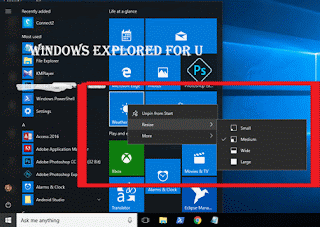
3) Right click on the live tile

4) You will find many options like Unpin from start,Resize and more...

5) Click on Resize you will see options like small ,medium and large


How to resize the live tile to short..

If you wish to make the live tile look smaller, then simply click on small

How to make live tile to wide..

If you wish to make the live tile look wider, then simply follow steps 1 to 5, then

click on wide.

How to make live tile to look large...

If you wish to make the live tile look larger, then simply follow steps 1 to 5, then

click on Large.

How to make live tile to look Medium...

If you wish to make the live tile look medium, then simply follow steps 1 to 5, then

click on Medium.

Thats it..

you had learnt how to resize live tiles in windows 10, which helps in customize start menu of 

windows 10.

Hope it is helpful.

Click to see all Windows 10 basic articles..

Available link for download

Read more »

How to disable hibernate mode in windows 10 Updated

How to disable hibernate mode in windows 10 Updated


Disable or turn off hibernate mode in windows 10 - thats what we gonna

see in this post - Works on Windows 10 Creators Update, Windows 10

Anniversary Update, and other editions of Windows like Windows 10 earlier builds like Aug 2015

and Nov 2015 builds..

In our last post, we had seen how to enable hibernate mode in windows 10, but it is best practice to

turn off hibernate mode when you are on low disk space..

What happens on hibernation ??


The process involved in hibernation is very vast, but i can explain in some simple words..

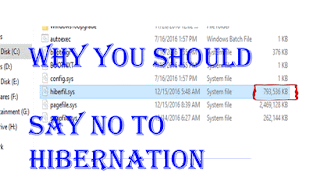
When we click hibernate our PC will save the current state of the process running on the device into

a system file called hiberfile.sys which will occupy a large amount of space when we perform

hibernation randomly. we can delete the file by using disk clean up  many of us who are beginners

are still unaware of the dangerous side of this hibernation that happens in low end PCs.So its better

to turn it off in Windows 10 when you have low disk space.

But, how?? You will only perform hibernation when you know the right step right? So, here i had

decided to show the way that will  hide the hibernation mode which can also be done using

powershell and command prompt...

Lets see how it can be done..


Just follow the below steps..

1) Open Control Panel.

[Helpful link : How to Open control panel in Windows 10 in different ways ]

Step 3 : Click on Hardware and Sound.

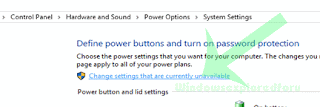
Step 4 : Find and Click On Change What the Power buttons do.

"the Option Change What the Power button do Will be Available under Power Options on right pane.

Step 5 : Click on Change Settings that Are unavailable on the Window that Opens.

Turn on or off Fast Startup in Windows 10


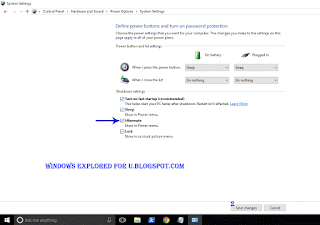
Step 6 : Clicking on it will enable grayed out shutdown settings..

Below the shutdown settings ,you will see various options like Turn on Fast startup, Sleep ,

Hibernate,etc..

Step 7 : Uncheck the Hibernate option check box.


Step 8 : Click on Save Changes..

Thats it...

Now, visit again your start menu and Shutdown menu, you will see hibernation mode no longer 

available in windows 10 

Enjoy..

Other Postss..

How to auto Shutdown your Windows 10 PC at particular time??????

Click to see all Windows 10 basic articles..


Available link for download

Read more »

Thursday, March 9, 2017

DAEMON Tools Lite 10 5 0 0222

DAEMON Tools Lite 10 5 0 0222


DAEMON

DAEMON Tools adalah aplikasi canggih untuk emulasi multiprotection. Program ini memungkinkan menjalankan Salinan Cadangan dari SafeDisc (C-Dilla), SecuROM atau Laserlock game yang dilindungi.

Masih menjadi yang terbaik dan paling praktis, mendukung banyak format dan tentu saja gratis. Daemon dari developer Duplex Secure LTD menjadi yang terbaik dikarenakan fungsinya yang simpel dan praktis. Penggunaan yang tidak membutuhkan konfigurasi yang sulit.
Format yang didukung oleh Daemon Tools Lite juga cukup luas dan umum digunakan di seluruh dunia. Berbagai fitur tambahan yang disediakan juga membantu dalam operasional pengguna saat menggunakannya, seperti fungsi mounting file image hanya dengan double-klik mouse lalu custom shortcut yang bisa diubah sesuai dengan keinginan anda.
Ini merupakan pengembangan lebih lanjut dari emulator SafeDisc Generik dan menggabungkan semua fitur-fiturnya.
Sering digunakan untuk menginstall game yang berformat image seperti iso, nrg, img dan file-file image lainnya.

Fitur DAEMON Tools Lite :
1.Menciptakan * iso dan * MDS gambar..
2.Mengemulasi sampai 4 virtual CD / DVD drive
3.Melakukan mount dan unmount gambar
4.Mendukung * b5t, * b6t, * bwt, * CCD, CDI *, * aba-aba, NRG *, * pdi, * isz…
Apa yang baru di versi terbaru ini :
– Support windows 8.1 & 10
– SPTD 1,84
– Minor fixes.
LisensiFreeware
DeveloperDAEMON Tools
Sistem Operasi  Windows XP/Vista/7/8/10
File :(675.85KB)
Link DownloadClick ? Download
VersionDAEMON Tools Lite 10.5.0.0222

Available link for download

Read more »

Connect to Suggested open hotspot Enable or Disable in Windows 10 Updated

Connect to Suggested open hotspot Enable or Disable in Windows 10 Updated


Connect to Suggested open hotspots in Windows 10 - Thats what we gonna see in this post...

Works on Windows 10

Creators Update, Windows 10 Anniversary Update, and other editions of Windows like Windows 10

earlier builds like Aug 2015 and Nov 2015 builds...

Windows 10 has a built in technology named WiFi sense that will allow your PC to sense the WiFi networks that are open around your PC.

If your PC have WiFi turned on, and there is an open WiFi network appears around your device,

Windows will capture and will examine whether it is safe through internet..

If that was safe, then windows would automatically connect to that hotspot making your device

internet connected.

If you wish to connect to those safe hotspots, that are around your device or if you wish to disable connect to suggested open hotspot option in Windows 10, then here is your guide.

Just follow the steps below on your PC

1) Open settings

2) Click on Network & Internet

3) Click on WiFi tab available on the left pane

4) You can see some options changing on the right pane..


Connect to Suggested open hotspot in Windows 10 [Updated]


Now , you can see an Option named WiFi sense under that there will be some text " Connect to 

suggested open hotspots..

If you wish to turn on Connect to suggested open hotspots..,then

Simply click/tap right side of the option, so that it looks off.

Remember not all networks are secure ????

Thats it..

On the other hand, if you wish to disable wifi sense or want to disable windows 10 automatically

connect to Unknown WiFi networks, then, simply click/tap on the left side of the option, so that it

looks off.

Thats it..

Youre done..

Are you a beginner ? then here are all posts that deals with mastering basics of Windows 10.

Click to see all the basic tutorials


Available link for download

Read more »

Wednesday, March 8, 2017

Miranda IM 0 10 65

Miranda IM 0 10 65


Miranda IM

Miranda IM adalah Freeware multi protokol instant messenger klien yang didesain untuk Windows dengan penggunaan recource memori yang sangat sedikit dan sangat cepat.

Miranda mudah digunakan sebagai instant messenger yang mendukung berbagai protokol dengan banyak UI dan layanan fitur yang dapat memungkinkan pengguna dari semua tingkat pengetahuan dengan mudah menyatukan semua teman-teman dari berbagai media sosial online.
Hal ini sangat cepat dan menggunakan sumber daya sistem yang sangat sedikit dan tidak memerlukan instalasi dan bahkan dapat dibuat untuk muat pada satu floppy disk atau USB drive dan berjalan tanpa instalasi pada PC. Secara default Miranda IM hadir dengan hanya beberapa fitur dasar, namun fungsinya selalu berkembang dengan penambahan (lebih dari 350 sekarang) plug-in yang mencakup segala sesuatu dari tweak visual yang sederhana untuk perubahan fungsi besar seperti penambahan protokol chat baru.
Jendela obrolan memegang banyak tab komunikasi yang Anda inginkan, dengan akses mudah ke emoticon, log, kamus, alat format teks dan banyak lagi.
Semua ini membuat Miranda sangat menyenangkan untuk menggunakan multi-protocol chat client yang sempurna untuk semua orang yang ingin dengan mudah mengakses teman-teman mereka pada jaringan yang berbeda.

Protokol yang tersedia di Miranda IM yaitu:
1. AIM (AOL Instant Messenger)
2. Facebook
3. Gadu-Gadu
4. IAX (Inter-Asterisk Exchange)
5. ICQ
6. IRC (Internet Relay Chat)
7. Jabber
8. MSN
9. Netsend
10.Tlen
11.Yahoo
dan banyak lagi lainnya…..
LisensiFreeware
DeveloperMiranda
Sistem Operasi  Windows XP/Vista/7/8/10
File :[32-bit] (7.63MB) [64-bit] (9.05MB)
Link Download 32 bitClick ? Download
Link Download 64 bitClick ? Download
VersionMiranda IM 0.10.65

Available link for download

Read more »

Airplane Mode in Windows 10 How to turn on or turn off in Windows 10 in Just 2 steps Updated

Airplane Mode in Windows 10 How to turn on or turn off in Windows 10 in Just 2 steps Updated


Airplane Mode in Windows 10 - How to turn on or turn off in Windows 10 - Thats what we gonna

see in this post - Works on Windows 10

Creators Update, Windows 10 Anniversary Update, and other editions of Windows like Windows 10

earlier builds like Aug 2015 and Nov 2015 builds.

If you are experiencing Airplane Mode issues like struck on Airplane mode, or if you cannot turn off

airplane mode in windows 10 then, i recommend you to follow the steps shown in this guide

[link],else just follow the steps shown in the post..

What is Airplane Mode or flight mode ?

Airplane mode is nothing but the thing used to control our communications. What will happen when

you turned on airplane mode is many things like your Cellular network wont work on PC, you

cannot connect to internet ( WiFi may work sometimes) but basically it is the mode designed to

block all internet connections coming towards your PC.

How to turn on or turn off Airplane mode in Windows 10 

If you wish to turn on or turn off airplane mode, then here are the steps..

If you are in earlier windows version build, then refer the steps shown in this article [Link]...

if you are in latest windows build like Windows 10 anniversary Update then, follow the steps below..

How to turn on Airplane mode in Windows 10 Anniversary Update

Note : The UI of Windows 10 doesnt changed much in Windows 10 creators Update as of Dec

19,2016 so you can follow the same steps in Windows 10 Creators update too..


1) Press Windows + I keys.

2) Click on Network and Internet

3) It will open a new window, with status as first option on the left pane.. Find the option called

Airplane Mode (it would be on left pane)

4) Now, on your right pane, you can find " Turn this on to stop all wireless communication, such 

as WiFi, cellular, and Bluetooth."

5) Tap on the right side of the option, so that it looks ON.

Thats it..

If, you wish to disable Airplane Mode, then refer the steps below..


How to turn off  Airplane mode in Windows 10 Anniversary Update

1) Press Windows + I keys.

2) Click on Network and Internet

3) It will open a new window, with status as first option on the left pane.. Find the option called

Airplane Mode (it would be on left pane)

4) Now, on your right pane, you can find " Turn this on to stop all wireless communication, such 

as WiFi, cellular, and Bluetooth."

5) Tap on the left side of the option, so that it looks OFF.

Thats it..

Mmm,???? let me tell you the smart way, just click on the Network/WiFi icon on the Taskbar and

click on Airplane mode,if will turn it on or off there..

If you are struck on Airplane mode, then see whether my experience help you [How to overcome 

struck in Airplane mode in windows 10 Link]

Hope it is helpful.


Thats the end of this post..

Click to read all other tutorials..

Available link for download

Read more »

Tuesday, March 7, 2017

Microsoft Security Essentials 4 10 209 0

Microsoft Security Essentials 4 10 209 0


Microsoft Security Essentials

Microsoft Security Essentials menyediakan perlindungan realtime untuk PC/Laptop Anda. terhadap virus, spyware, dan software berbahaya lainnya.

Microsoft Security Essentials merupakan antivirus buatan Microsoft Corporation. Seperti anti virus lainnya, fungsinya sudah jelas untuk melindungi komputer kita dari serangan virus, trojan, worm and spyware.
Anti Virus ini memiliki tampilan halaman utama yang menunjukkan status keamanan komputer Anda. Ikon hijau melambangkan bahwa status keamanan komputer anda Aman/bagus.
Microsoft Security Essentials selalu up to date dan berjalan secara otomatis (jika terhubung ke internet) untuk membantu melindungi komputer Anda terhadap malware dan ancaman berbahaya lainnya. Ketika komputer Anda mengalami masalah yang membutuhkan perhatian Anda, maka tampilan halaman utama dari Microsoft Security Essentials akan berubah berdasarkan isu yang sedang dihadapi oleh komputer anda. Papan status akan berubah baik berwarna kuning atau merah tergantung pada situasi yang sedang terjadi, dan notifikasi muncul di lokasi yang menonjol pada halaman dengan tindakan yang disarankan.
Ikon kuning berarti bahwa status komputer anda berpotensi tidak dilindungi dan Anda harus mengambil beberapa tindakan, seperti menyalakan perlindungan real-time, menjalankan sistem scan.
Ikon merah menandakan bahwa komputer Anda berisiko dan Anda harus melakukan tindakan secepat mungkin sesuai dengan rekomendasi dari notifikasi yang muncul.

LisensiFreeware
DeveloperMicrosoft
Sistem Operasi  Windows XP/Vista/7/8/10
File :[32-bit] (11.66MB) [64-bit] (14.36MB)
Link Download 32 bitClick ? Download
Link Download 64 bitClick ? Download
VersionMicrosoft Security Essentials 4.10.209.0

Available link for download

Read more »

10 Aplikasi Sosial Keren yang Belum Banyak Diketahui!

10 Aplikasi Sosial Keren yang Belum Banyak Diketahui!


10 Aplikasi media sosial yang keren yang membuatmu semakin banyak teman
Manusia adalah makhluk sosial, sehingga mungkin tidak mengherankan bahwa jaringan sosial terus tumbuh menjadi salah satu platform dominan di  era web modern ini. Sebagian besar dari kita tentu mendapatkan berita, persahabatan, hiburan dan lebih dan teman- teman baru dari orang-orang seperti Facebook dan Twitter.
Sementara situs-situs dan aplikasi seperti Snapchat, Instagram dan aplikasi terkenal lainnya mungkin mendominasi dalam hal jumlah cakupan para pengguna. Sebenarnya masih banyak lagi aplikasi medi sosial lainya. Berikut adalah beberapa favorit situs yang belum familiar yang tidak kalah dengan situs sosial diatas :

1.Peach

Aplikasi ini sama seperti WhatsApp maupun line. Namun aplikasi ini penuh warna, bebas, mengalir secara keseluruhan. Hal ini juga memuat tampungan ide feed berita mendukung lebih singkat, pendekatan yang kurang permanen. Pengguna bisa menambahkan emoji untuk semakin menyemarakkan Peach.
Pengguna aplikasi terbaru Peach bebas menulis atau mengekspresikan semua perasaannya. Terlebih anda bisa menggambar atau membikin karya seni. Nah, jika pada WhatsApp ataupun line simple berbeda dengan aplikasi Peach ini yang bisa terhubung langsung ke Facebook maupun Twitter.

2.Ello

Aplikasi Ello  masih baru-baru ini memposisikan diri sebagai “jaringan pencipta ‘” di mana anda dapat mempromosikan dorongan artistik Anda bebas dari intrik perusahaan dan iklan Facebook. Anda bisa memulai menggunakan akun ini atau sekedar mengintip tanpa harus mendaftar untuk sebuah akun, dan bisa menjalankan aplikasi antarmuka.
Dilansir Mashable, Ello adalah jejaring sosial independen tanpa iklan yang hanya bisa diinvite. Artinya, pengguna baru bisa mengaksesnya jika sudah mendapat persetujuan dari Ello. Jika biasanya Facebook sering dibanjiri iklan dan siapa saja bisa langsung menjadi pengguna. Aplikasi ini dikenal dengan aplikasi anti Facebook.

3.Beme

Nah pada dasarnya aplikasi Beme ini sama seperti snapchat. Mulanya aplikasi Beme dibuat berdasarkangagasan instan, berbagi video, seperti yang diharapkan kemudian dibuat oleh YouTube legenda dengan pengguna Casey Neistat. Jangan khawatir tentang bagaimana rekaman amatir anda terlihat. Santai saja video yang anda upload tidak bisa terlihat di publik tapi hanya untuk teman- teman anda.
Video ini berdurasi 4 detik namun anda bisa mengambil lebih banyak video.

4.Yik Yak

Yik Yak adalah tempat untuk bebas bersosial media, pesan anonim dari dekat lokasi Anda. Pada awalnya yang terdengar agak sia-sia, tetapi berpikir sekolah, perguruan tinggi, festival musik, kantor dan lebih – tempat di mana Anda dengan orang-orang dalam masyarakat dan dapat memanfaatkan percakapan jauh lebih mudah daripada di Facebook. Tentu saja, jika tidak ada pengguna lain di daerah Anda, itu bisa sangat kesepian di Yik Yak.
Nah jika pada aplikasi lain anda harus mencantumkan alamat email anda berbeda dengan Yikyak. Aplikasi ini menandakan ‘anonymous’ tidak berlaku di aplikasi tersebut. YIK YAK sebuah aplikasi yang bisa di gunakan tanpa harus registrasi apapun dan tidak ada informasi yang di minta, YIK YAK benar-benar sebagai aplikasi Anonymous atau tidak saling mengenal.

5.Untappd

Kegiatan sosial tidak mendapatkan jauh lebih sosial daripada memiliki bir, jadi inilah Untappd , jaringan sosial mobile berbasis di sekitar bar dan bir. Anda dapat menggunakan aplikasi untuk berbagi di mana Anda sudah minum, dan apa yang Anda minum, dan menemukan tempat-tempat baru dan tipples imbalan (berguna jika Anda perlu rekomendasi di kota baru).
Untappd adalah aplikasi yang mudah digunakan jika harus dibandingkan dengan banyak aplikasi yang lainnya. Aplikasi ini terhubung dengan Twitter dan Facebook membuat Untappd sangat baik untuk setiap jenis penikmat bir.

6.Path

Ada sedikit lebih banyak kesempatan yang Anda dengar dari jalan dari beberapa jaringan lain dalam daftar ini, karena telah mengumpulkan tingkat tertentu perhatian sejak diluncurkan pada tahun 2010. Filosofi yang mendasari jalan adalah bahwa Anda fokus pada kualitas bukan kuantitas: ada batas pada jumlah teman Anda dapat menambahkan pada layanan, dan aplikasi yang dibangun untuk beberapa berbagi pribadi dan swasta.

7Kik

Meskipun Kik tidak memiliki jenis yang sama dari profil sebagai sesuatu seperti WhatsApp atau Facebook Messenger,  namun aplikasi ini memiliki banyak fitur yang sama . Anda bisa mengobrol dengan sangat mudah, dan ada semua fitur yang biasa Anda harapkan untuk menemukan dalam sebuah aplikasi seperti ini, seperti dukungan untuk GIF dan stiker serta group messaging. Dengan lebih dari 100 juta orang menginstal, harus melakukan sesuatu yang benar.

8.ASKfm

Agak aneh dikapitalisasi ASKfm tidak persis jaringan sosial kecil . 150 juta pengguna yang terus bertambah. Premis adalah bahwa Anda menggunakannya untuk mengajukan pertanyaan dan memberikan jawaban, yang ternyata menjadi cara yang agak efektif berinteraksi dengan teman dan orang asing acak di internet. Watch out untuk troll jika Anda mencobanya.

9.Oovoo

Sekali lagi, Oovoo bukan jaringan sosial terutama kecil, tapi popularitasnya terbatas pada bagian-bagian tertentu dari dunia, yang berarti anda mungkin tidak menemukan itu. Fitur utama di sini terkait dengan video chatting, apakah itu satu-satu dengan pal terbaik atau dalam kelompok dengan suku Anda dari teman-teman (atau keluarga). Ada juga komponen SMS sehingga Anda tidak perlu mengambil rute video.

10.Telegram

Sebuah aplikasi yang menempatkan keamanan di atas segalanya . Anda dapat menggunakan aplikasi pesan pada hampir semua platform di luar sana, dan melalui browser web Anda, dan dilengkapi dengan bonus tambahan seperti pesan merusak diri dan transfer dokumen. Terlebih lagi, tidak ada iklan dan tidak ada biaya untuk berlangganan.
Nah itulah 10 Aplikasi media sosial yang keren yang membuatmu semakin banyak teman. Gimana? Tertarik?

Available link for download

Read more »

Aero Glass 1 4 6 1 5 1 for Windows 8 1 Windows 10

Aero Glass 1 4 6 1 5 1 for Windows 8 1 Windows 10


Aero Glass for Windows 8 & Windows 8.1

Aero Glass for Windows 8.1 & Windows 10 RS

Aero Glass adalah sebuah program yang berguna untuk mengembalikan Windows Aero kedalam Windows 8.1 dan juga Windows 10. Seperti yang kita tahu, Windows Aero merupakan salah satu fitur yang dihapus oleh Microsoft. Tidak seperti pendahulunya Windows 7 yang sudah memiliki Windows Aero secara default. Aero Glass bisa mengembalikan fitur tersebut dan akan membuat tampilan Windows 8.1 kalian semakin cantik. Saya sendiri pernah me-review AeroGlass disini.

Aero Glass for Win8.1+ v1.4.6 bisa digunakan untuk Windows 8.1 & Windows 10 TH1 Build 10586.

Aero Glass for Win8.1+ v1.5.1 bisa digunakan untuk Windows 10 build 14393.

SCREENSHOT WINDOWS 8.1


SCREENSHOT WINDOWS 10

Windows 10 Aero Glass

DOWNLOAD DISINI

PASSWORD RAR : www.software182.com

Available link for download

Read more »

Sunday, March 5, 2017

10 Master Powerpoint Bundle Free Download

10 Master Powerpoint Bundle Free Download


????? ????? ???? ?? ??? ??? ??? ??? ??????? ??????? ???? ????? ????? ????? ???. ????? ???? ????????? ????? 20?? ??? ??? ????? ?????. ?????? ??? ?? ?????? ??? ?????? ????????. ??????????? , ??????? ???? ????? ???? ??????? ????? ????? ???????  ???????? ????? ???. ??? 20$ ????? ????????????(powerpoint templates) 10?? ??? ?????. ???? ?????? ????? ????? ?????? ???? ??? ???????? ??????. ?????? ????????? ??????.


Download.rar72.2MB

Zip Password - www.pariganakapituwa.com

Available link for download

Read more »

Safe mode in Windows 10 How to enter to safe mode in 2 steps Updated to Windows 10 creators update

Safe mode in Windows 10 How to enter to safe mode in 2 steps Updated to Windows 10 creators update


Safe mode in Windows 10 - how to enter into safe mode in Windows 10 in 2steps works on Windows 10 creators update, windows 10 anniversary update and other builds of Windows 10..

Whenever you are faced with an error what  people would instruct you to do is just boot into safe mode and make sure whether it works.. But we never say how to boot into the safe mode. So you guys if you are searching on how to boot into safe mode in your Dell laptop or how to boot into safe mode in HP laptop or on any desktop or laptops, here is your guide....

Do you need any software ??

No, we dont need an software to enter into safe mode...

Then how do it ??

Just follow the below steps..

How to boot into safe mode in Windows 10 on Windows 10 desktop and windows 10 laptop..

I like to point out an important thing..

There are many ways we can use to boot our pc into safe mode like using command prompt, using PowerShell and using registry.. however in this post we are gonna see only the steps on the beginner level, that will work for sure..

The above video is based on safe mode which starts with entering into safe mode..

follow the first few steps shown in the video if you cant find safe mode or if you lost in below step

1) Switch on your PC

2) After your windows boots, you will see the login screen.

3) Now, you can see the power button on the bottom (right corner) of the login screen..

4) click the power button you will see options like shutdown, restart, etc..
Now, hold your shift key on the keyboard and press restart..

5) It will reboot your computer, and will display the advanced options ...

6) select number 4 on the keyboard..

Now, it will boot your PC to safe mode.

Thats it..


Available link for download

Read more »

Saturday, March 4, 2017

Download Game Killer v4 10 Apk LATEST

Download Game Killer v4 10 Apk LATEST


gamekiller apk download
Download Game Killer v4.10 Apk

GameKiller is an Android application which will help you to hack Offline android games coins, score, money, gems, etc… It is one of the best applications out there to do such a thing.
Features of GameKiller v4.10 Apk
  • Search game worth with exact number
  • Search game value with unclear directions, e.g. bigger or smaller
  • Lock the video game value to a repaired number
  • Save/Load the taken care of list
  • Touch GameKiller sprite to bring up the device during gaming
  • HEX edit
  • Unload code
  • Bugs Fixed
  • Much more
Whats New in v4.10
  • Android4.4 and above versions of the ROM portion of the suspension is no longer necessary to manually open the window;
  • Eight keeper device is activated, if the originally selected application does not quit, do not switch to a new application;
  • Click on the application icon and name on the main interface, you can select the application.
Notes:
  • GameKiller will not work for online Games like Teen Patti and Hayday.
  • For using GameKiller you will need a Rooted android device.
  • If anything goes wrong mention us in the comments.
How to Install ?
  1. Download GameKiller Apk from the Links below.
  2. In settings allow downloading from unknown sources.
  3. Install it and run it.
  4. Done!Enjoy :)
How to Use ?
  • Open GameKiller then minimize it.
  • Open the game where you want to have unlimited money, gems,…
  • Look how much coins you have, open game killer and write the value you have seen, press the search button and AUTO IDENTIFY, now Game Killer will find many results,so you have to spend or play the game so that the coins change, then search the new value in Game Killer so that it find less results. Keep trying until it finds few or one result.
  • Now that you have the results click the results and change all the values and hit ok.
  • That’s all. ??
Screenshot

Download Links
GameKiller v4.10 Apk (1MB) | Mirrors


Available link for download

Read more »

Turn off or disable Metered connections in Window 10 we need to do it for Windows 10 Creators Update Guide

Turn off or disable Metered connections in Window 10 we need to do it for Windows 10 Creators Update Guide


Turn off or disable Metered connections in windows 10 -  Thats what we gonna see in this post...

Works on Windows 10

Creators Update, Windows 10 Anniversary Update, and other editions of Windows like Windows 10

earlier builds like Aug 2015 and Nov 2015 builds...

In our last post, we had discussed how to turn on metered connections in Windows 10 so that you

can disable or delay updates, Prevent apps from auto downloading,etc..But ,if you have changed

your mind or wish to try the latest windows 10 build then you need to remove metered connections

for windows 10 download that updates. So here is a post, on how to do it..

                                             
                                                 [Check the above video tutorial,if you wish]


Do you need any software ?

No, you dont need to download software to disable metered connection in Windows 10, just follow

the below steps..


How to disable metered connection in Windows 10


1) Press Windows + I which will open settings.

2) Select Network & Internet.

3) Click on WiFi tab on the left pane.

4) Select Manage known networks option(Which will be on right Pane).

5) It will open a new window,on that click on the Network you wish to turn off metered connection.

6) When you clicked,it will Show Properties and forget, Select Properties.

7) Scroll down and Find Metered connection Slide/Click on left Side of the Option that available

under Metered Connections,show that it shows OFF.

Thats it...

Are you a beginner ? then here are all posts that deals with mastering basics of Windows 10.

Click to see all the basic tutorials

Available link for download

Read more »

How long will take to upgrade to Windows 10 Windows 10 Upgrade FAQ

How long will take to upgrade to Windows 10 Windows 10 Upgrade FAQ


How long will take to upgrade to Windows 10 ? thats what we gonna see in this post...If you have

questions like How long will take to upgrade to Windows 10 from windows 7 or How long will take

to upgrade to Windows 10 from windows 8.1, How long will take to upgrade to Windows 10 from

windows 8 or How long will take to upgrade to Windows 10 Creators Update from Windows 10

Anniversary Update then here is your guide..


For the above question, the answer would be the one..

it depends on your Hardware..

If you have the system configuration required to install Windows 10 [link], then i can say the

windows 10 upgrade will complete within 30 minutes.. But if you are clean installing Windows 

10 then the amount of time it takes will be short like 15 minutes.

But, in the mean while if you have some older machines, then it would take some more time.. But it

would complete within 2 - 3 hours..

If you think windows 10 taking forever to install or windows 10 upgrade taking long time that was

more than 4 hours, then what i recommend is to just unplug the USB drive or media that you are

connected and check whether your system meets the minimum configuration windows 10 needs.

If your Windows 10 meets those.. then reinstall the Windows 10

Else, stay on the version of Windows you are using right now..????


Available link for download

Read more »