Showing posts with label tutorial. Show all posts
Showing posts with label tutorial. Show all posts
Friday, March 10, 2017
Resize live tiles in Windows 10 How to do tutorial
Resize live tiles in Windows 10 How to do tutorial
Resize live tiles in Windows 10 - How to do tutorial thats what we gonna
see in this post - Works on Windows 10 Creators Update, Windows 10
Anniversary Update, and other editions of Windows like Windows 10 earlier builds like Aug 2015
and Nov 2015 builds.
In our last post we had seen how to resize the start screen and how to resize the taskbar in
windows 10. In this post lets see how to resize live tiles in windows 10
Do you any software ?
We dont need an software to resize live tiles in windows 10.
just follow the below steps..
How to resize live tiles in Windows 10
1) Press Windows (logo) key on your keyboard or press start button
2) On, your right pane you will find the live tiles..
[Helpful link : How to turn on or turn off live tiles on windows 10 ]
3) Right click on the live tile
4) You will find many options like Unpin from start,Resize and more...
5) Click on Resize you will see options like small ,medium and large
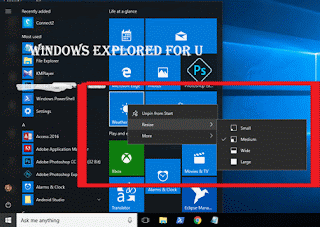
How to resize the live tile to short..
If you wish to make the live tile look smaller, then simply click on small
How to make live tile to wide..
If you wish to make the live tile look wider, then simply follow steps 1 to 5, then
click on wide.
How to make live tile to look large...
If you wish to make the live tile look larger, then simply follow steps 1 to 5, then
click on Large.
How to make live tile to look Medium...
If you wish to make the live tile look medium, then simply follow steps 1 to 5, then
click on Medium.
Thats it..
you had learnt how to resize live tiles in windows 10, which helps in customize start menu of
windows 10.
Hope it is helpful.
Click to see all Windows 10 basic articles..
see in this post - Works on Windows 10 Creators Update, Windows 10
Anniversary Update, and other editions of Windows like Windows 10 earlier builds like Aug 2015
and Nov 2015 builds.
In our last post we had seen how to resize the start screen and how to resize the taskbar in
windows 10. In this post lets see how to resize live tiles in windows 10
Do you any software ?
We dont need an software to resize live tiles in windows 10.
just follow the below steps..
How to resize live tiles in Windows 10
1) Press Windows (logo) key on your keyboard or press start button
2) On, your right pane you will find the live tiles..
[Helpful link : How to turn on or turn off live tiles on windows 10 ]
3) Right click on the live tile
4) You will find many options like Unpin from start,Resize and more...
5) Click on Resize you will see options like small ,medium and large
How to resize the live tile to short..
If you wish to make the live tile look smaller, then simply click on small
How to make live tile to wide..
If you wish to make the live tile look wider, then simply follow steps 1 to 5, then
click on wide.
How to make live tile to look large...
If you wish to make the live tile look larger, then simply follow steps 1 to 5, then
click on Large.
How to make live tile to look Medium...
If you wish to make the live tile look medium, then simply follow steps 1 to 5, then
click on Medium.
Thats it..
you had learnt how to resize live tiles in windows 10, which helps in customize start menu of
windows 10.
Hope it is helpful.
Click to see all Windows 10 basic articles..
Available link for download

Friday, February 10, 2017
How do i reinstall Windows 10 Tutorial
How do i reinstall Windows 10 Tutorial
How to i reinstall Windows 10 - Thats what we gonna see in this post.. If you have questions like
How do i reinstall Windows 10, how to do i reinstall Windows 10 when i have no windows 10
media, then here is an guide.
You can reinstall the windows 10 when your hard drive crash. or if you have any errors that happens
in the name of the DPC Watchdog violation or any Blue screen of death errors ..
Even though the Blue screen of death [BSOD] happens now, then (who knows it may be also forever )
for every simple reason like improper configuration, which means your hardware doesnt meet the
required hardware configuration to run Windows 10. Even though Microsoft Says, we can run
Windows 10 when our device runs Windows 8, but the truth is it depends on the System
configuration.
[See : What is the system requirements for Windows 10]
You need to install Windows 10 32 bit when you have only 2 gb of ram, as installing x64 bit version
of Windows 10 will occupy more ram.
{ Click to see : How to find the amount of RAM your PC has}
Even you have enough ram and enough System configuration sometimes it may introduce restart
loop or will spoil something after Update (Like it broke WebCams on Windows 10 Anniversary
Update}..
Whatever the cause you may end by reinstalling Windows 10. But, if you dont know how to do it..
then here is an tutorial.
To assist you better i had created the above video tutorial,check that for complete steps on how to
reinstall windows 10...
Download link : https://www.microsoft.com/en-us/software-download/windows10ISO
Hope it is helpful.
How do i reinstall Windows 10, how to do i reinstall Windows 10 when i have no windows 10
media, then here is an guide.
You can reinstall the windows 10 when your hard drive crash. or if you have any errors that happens
in the name of the DPC Watchdog violation or any Blue screen of death errors ..
Even though the Blue screen of death [BSOD] happens now, then (who knows it may be also forever )
for every simple reason like improper configuration, which means your hardware doesnt meet the
required hardware configuration to run Windows 10. Even though Microsoft Says, we can run
Windows 10 when our device runs Windows 8, but the truth is it depends on the System
configuration.
[See : What is the system requirements for Windows 10]
You need to install Windows 10 32 bit when you have only 2 gb of ram, as installing x64 bit version
of Windows 10 will occupy more ram.
{ Click to see : How to find the amount of RAM your PC has}
Even you have enough ram and enough System configuration sometimes it may introduce restart
loop or will spoil something after Update (Like it broke WebCams on Windows 10 Anniversary
Update}..
Whatever the cause you may end by reinstalling Windows 10. But, if you dont know how to do it..
then here is an tutorial.
To assist you better i had created the above video tutorial,check that for complete steps on how to
reinstall windows 10...
Download link : https://www.microsoft.com/en-us/software-download/windows10ISO
Hope it is helpful.
Available link for download
Subscribe to:
Posts (Atom)