Showing posts with label manager. Show all posts
Showing posts with label manager. Show all posts
Wednesday, March 1, 2017
Bluetooth doesnt appear on Device Manager of Windows 10 Solved
Bluetooth doesnt appear on Device Manager of Windows 10 Solved
Bluetooth doesnt appear on Device Manager of Windows 10 - After upgrading from Previous
Windows 10 to latest Windows 10 ( Windows 10 Anniversary update to Windows 10 Creators
Update] Fix - Thats what we gonna see in this post.
Works on Windows 10 Creators Update, Windows 10
Anniversary Update, and other editions of Windows like Windows 10 earlier builds like Aug 2015
and Nov 2015 builds.
If your Bluetooth was missing after upgrading to Windows 10, the first solution i recommend was
to search Device manager and Update drives if necessary.

But, what if Bluetooth doesnt appear on device manager ? but you know your device have Bluetooth
because you had connected and transferred files on Previous version of Windows or Windows 10 ????
Dont worry, here is your guide..
[Helpful link : How to check whether my device have bluetooth or not in Windows 10]
1) Open Device Manager.
Dont know, how ?? Dont worry, let me help you. Follow the instructions shown in the below link..
[Helpful link : How to Open Device Manager in Windows 10 [Guide]]
2) Now, you are on device manager, Expand Other devices (or)
3) See, whether you have any Unknown device ( they will have exclamation mark or unknown device text in it)
4) Right click on the Unknown device
5) You will see many options, on that select Properties
6) It will display the properties window, Click on the details tab
7) On the property list, you can find Hardware Ids, click on it / Note it..
The Ids will be usually, look like USBVID_(somevalue).Etc something..
8) Right click on it and select Copy.
9) Now, open your browser and simply paste the ID on any search engine like google or bing
10) Visit the manufacturer website,download and install the latest driver for the device..
Remember that must be compatible to windows 10.
11) Restart Your PC
[ Helpful link : How to restart or reboot windows 10]
Thats it..
It will fix your problem..
Thats the end of this post..
Click to read all basic tutorials..
Windows 10 to latest Windows 10 ( Windows 10 Anniversary update to Windows 10 Creators
Update] Fix - Thats what we gonna see in this post.
Works on Windows 10 Creators Update, Windows 10
Anniversary Update, and other editions of Windows like Windows 10 earlier builds like Aug 2015
and Nov 2015 builds.
If your Bluetooth was missing after upgrading to Windows 10, the first solution i recommend was
to search Device manager and Update drives if necessary.
But, what if Bluetooth doesnt appear on device manager ? but you know your device have Bluetooth
because you had connected and transferred files on Previous version of Windows or Windows 10 ????
Dont worry, here is your guide..
[Helpful link : How to check whether my device have bluetooth or not in Windows 10]
1) Open Device Manager.
Dont know, how ?? Dont worry, let me help you. Follow the instructions shown in the below link..
[Helpful link : How to Open Device Manager in Windows 10 [Guide]]
2) Now, you are on device manager, Expand Other devices (or)
3) See, whether you have any Unknown device ( they will have exclamation mark or unknown device text in it)
4) Right click on the Unknown device
5) You will see many options, on that select Properties
6) It will display the properties window, Click on the details tab
7) On the property list, you can find Hardware Ids, click on it / Note it..
The Ids will be usually, look like USBVID_(somevalue).Etc something..
8) Right click on it and select Copy.
9) Now, open your browser and simply paste the ID on any search engine like google or bing
10) Visit the manufacturer website,download and install the latest driver for the device..
Remember that must be compatible to windows 10.
11) Restart Your PC
[ Helpful link : How to restart or reboot windows 10]
Thats it..
It will fix your problem..
Thats the end of this post..
Click to read all basic tutorials..
Available link for download

Tuesday, February 28, 2017
Password Safe and Manager PRO v5 2 3 APK Latest
Password Safe and Manager PRO v5 2 3 APK Latest

You want a secure way of saving all your passwords instead of writing them down on a sheet of paper? Password Safe is your solution! It stores and manages all entered data in an encrypted way, so you have a secure storage of your access data and only have to remind your master password. The encryption is based on the Advanced Encryption Standard (AES) 128bit and can be increased up to 256bit in pro-version.
You can trust PasswordSafe 100% as it DOES NOT have any access to the internet.
Note, that there is NO sync-feature, because of the missing internet-permissions. So if you want to share the database, upload it to Dropbox (or similiar) and import it from there on another device. With the included widgets you can also copy fast and easy a randomly created password to your clipboard from your homescreen.
Features:
- secure storage of your passwords, access data, etc.
- categorize your entries in the Password Safe
- access via one single master-password
- Password Generator for creating secure passwords
- backup and restore of the encrypted database
- customizability of the user interface
- statistics
- automatic clearing of clipboard
- Password Generator-widgets
- auto-backup
- csv-import/export
- no unnecessary Android rights
- [PRO] entry-elements can be defined and reordered
- [PRO] define multiple categories for an entry
- [PRO] definition of encryption key size up to 256bit
- [PRO] import/export from/to excel table
- [PRO] auto-lock
- [PRO] encrypted CSV-files
- [PRO] auto-backup to encrypted CSV
- [PRO] self-destruction
Whats New:
- add possibility to duplicate entries
- Android 7.1 rounded icons
Fixed issues:
- reordering fields
- multiline passwords didnt show correctly in history
- backslashes in csv
- improve performance/reduce memory usage

Download Password Safe and Manager PRO v5.2.3 APK
NOTE: For Dailyuploads.net - UnCheck "Secured Download manager" Box & Click Download.
This Post is Protected by Wanem Club © Copyright 2017, All Rights Reserved.
Available link for download
Monday, February 20, 2017
Internet Download Manager 6 21 Build 9 Full Version
Internet Download Manager 6 21 Build 9 Full Version

Internet Download Manager IDM is a download management application that can be used only for the Windows operating system. Internet Download Manager, Downloads divides into several strands to be done faster downloading. IDM with programs, Internet Explorer, Opera, Netscape, Mozilla Firefox, Google Chrome works. IDM contains no spyware or adware that no report has been published. IDM can download movies that you can see on the website.
When playing a movie from the Internet automatically, ie the name of the video or audio Download this video next page appears, click on the video or audio can be loaded. With this software can increase download speeds. Unlike other download managers that segment files before downloading take a while to download depending on the speed of IDM in Internet.
Before i have share Internet Download Manager 6.21 Build 2 Full Version with my visitors.
File downloading the pieces, and the download speeds this improve Download File will be apparent feature of this software is simple, supports most popular transmitters browsing, easy installation, ability to continue downloading the disconnect from the Internet.
Internet Download Manager 6.21 Build 9 Full Version

For those who experienced the error “Fake Serial Number”, please apply the following Instructions.
How To Install:
- Run Setup.exe then install as usual.
- If you are finished, Right-click the icon IDM in tray icon and select exit.
- Copy the Patch.exe file to the directory folder of IDM installed.
- Run the patch and click Patch button.
- Now enter your First name and Last name then click Register.
- Done.
Whats new in version 6.21 Build 9
(Released: Sep 05, 2014)
- Added support for Firefox 34 and SeaMonkey 2.30
- Fixed problems with Google Chrome extension for non-default zoom

Available link for download
Tuesday, February 14, 2017
How to find Device Manager Version in Windows 10 Updated
How to find Device Manager Version in Windows 10 Updated
Check device manager version in Windows 10 - How to tutorial..
In our last post we had seen how to access device manager in Windows 10 which is an essential
when dealing with drivers. In this post lets see how to check device manager version in Windows 10
Works on Windows 10 Creators Update, Windows 10
Anniversary Update, and other editions of Windows like Windows 10 earlier builds like Aug 2015
and Nov 2015 builds.

In our last post we had seen how to access device manager in Windows 10 which is an essential
when dealing with drivers. In this post lets see how to check device manager version in Windows 10
Works on Windows 10 Creators Update, Windows 10
Anniversary Update, and other editions of Windows like Windows 10 earlier builds like Aug 2015
and Nov 2015 builds.
Do you need any software ?
We dont require any software except device manager ( but device manager is inbuilt, so you dont
need to download any software)
Then, how to do it..
Just follow the below steps..
How to check device manager version in Windows 10
1) Open device manager
Dont know, how ?? Dont worry, let me help you. Follow the instructions shown in the below link..
[Helpful link : How to Open Device Manager in Windows 10 [Guide]]
2) Click on the Help Option
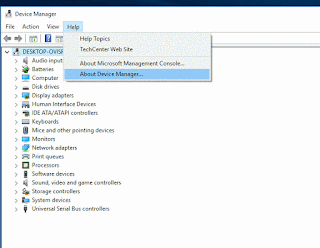
3) It will display options like Help Topics, Technet Website, About Management console,etc..
4) Click on About Device Manager.
Thats it..
It will display the device manager version of Windows 10.
Works on all Windows 10 laptops and Windows 10 desktops.
Thats the end of this post..
Click to read all basic tutorials..
[Helpful link : How to Open Device Manager in Windows 10 [Guide]]
2) Click on the Help Option
3) It will display options like Help Topics, Technet Website, About Management console,etc..
4) Click on About Device Manager.
Thats it..
It will display the device manager version of Windows 10.
Works on all Windows 10 laptops and Windows 10 desktops.
Thats the end of this post..
Click to read all basic tutorials..
Available link for download
Saturday, February 11, 2017
Download Internet Download Manager IDM 6 26 Build 9 Full Software
Download Internet Download Manager IDM 6 26 Build 9 Full Software

Internet Download Manager (IDM) is a reliabe and very useful tool with safe multipart downloading technology to accelerate from internet your downloads such a video, music, games, documents and other important stuff for you files. IDM has a smart download logic accelerator and increases download speeds by up to 5 times, resumes and schedules downloads. Comprehensive error recovery and resume capability will restart broken or interrupted downloads due to lost connections, network problems, computer shutdowns, or unexpected power outages. Simple graphic user interface makes Internet Download Manager user friendly and easy to use. Unlike other download managers and accelerators, IDM segments downloaded files dynamically during download process and reuses available connections without additional connect and login stages to achieve best acceleration performance.
Features:
• All popular browsers and applications are supported!
• Easy downloading with one click.
• Download Speed Acceleration.
• Download Resume.
• YouTube grabber.
• Simple installation wizard.
• Drag and Drop.
• Automatic Antivirus checking.
• Advanced Browser Integration.
• Built-in Scheduler.
• IDM includes web site spider and grabber.
• IDM supports many types of proxy servers.
• IDM supports main authentication protocols:
• Download All feature.
• Customizable Interface.
• Download Categories.
• Download limits.
• IDM is multilingual.
Whats new in version IDM 6.26 Build 9
(Released: Nov 11, 2016)
• Improved video recognition in web players
• Fixed the problem with erroneous video interceptions from web players
• Fixed bugs
Available link for download
Thursday, February 9, 2017
Download Yamicsoft Windows 10 Manager 2 0 1 Full Software
Download Yamicsoft Windows 10 Manager 2 0 1 Full Software

Windows 10 Manager is a system utility that helps you optimize, tweak, repair and clean up Windows 10. It will increase your system speed, eliminate system fault, improve system security, and meet all of your expectations.Windows 10 Manager is a system utility that helps you optimize, tweak, repair and clean up Windows 10. It will increase your system speed, eliminate system fault, improve system security, and meet all of your expectations.
Why Should I use Windows 10 Manager?
Windows 10 is the newest Operating System for home users and professionals alike. Windows 10 brings clarity to your world, so you can more safely and easily accomplish everyday tasks and instantly find what you want on your PC. Windows 10 Manager is the powerful software tool to tweak and optimize your Windows 10, it bundles more than 30 different utilities in one and help your system faster and more stable, secure and personal!
Features and Benefits of Windows 10 Manager:
- Information
Get detailed system and all hardware information on your system; help you find out the installation key of Windows, Office products; show all detailed information of running processes and threads on your machine; Windows 10 Manager offers 1-clicking Cleaner cleans your system automatically; Repair Center helps you to fix various system problems.
- Optimizer
Tweak your system to improve windows startup and shutdown speed, tweak your hardware to increase system speed and performance; Control what is started on Windows startup, check and repair the advanced starup items to restore the malicious change by viruses; Tune up and optimize system services and Task Schedule, turn off smartly some unnecessary system services and tasks to improve system performance.
- Cleaner
Find out which files or folders engross your disk space and shown with chart; Smart Uninstaller can fully delete programs from your system without residual files and Registry entries; Find and clean junk files to increase Hard Disk space; Duplicate Files Finder can scan your computer for files with the same size, name and modification time; Registry Cleaner checks and repair incorrectly linked Registry entries; Registry Defrag rebuilds and re-indexes your Registry to reduce registry access time and therefore improve application responsiveness; Desktop Cleaner can clean useless icons and files on Desktop easily.
- Customization
Customize the look of your system by tweaking system Explorer, Desktop, Start Menu, Taskbar and notification area; Manage the pinned items and can pin any files or folders to Taskbar and Start Screen; Create the quick startup items on Taskbar with the Jump List launcher; Tune up Windows 10 boot menu; Edit context menus of mouse Right-Clicking; Edit easily the Win + X menu that shown when right-click on Desktop bottom-left corner or Win + X keyboard shortcut ; Create the shortcut that executed quick on run dialog box. Visual Customizer can change system and file type icons, change the lock screen image automatically.
- Security
Improve system security by tweaking system components, UAC and login settings; Tune up System Restore options; Hide and restrict to access drives and programs; Encrypt/decrypt files, move system folders to safe locations; Undelete the files that accidentally deleted or formatted on disk; Privacy Protector can maintain your personal privacy by eliminating the tracks that you leave behind; Hide, add or delete the Control Panel entries.
- Network
Optimize your Internet connection speed, manage all shares items; Tweak your Internet Explorer easily; IP Switcher can switch your IP address easily on different networks; Edits the Hosts file to speed up surfing internet and permit only to access the specified Hosts.
- Misc. Utilities
Show the collection of Windows utilities and pin system items to Start Screen and Taskbar; split and merge any files; Automatically back up files regularly using Super Copy. Registry Tools help you to operate Registry easily.
Available link for download
Tuesday, February 7, 2017
Internet Download Manager 6 21 Build 14 Full Version
Internet Download Manager 6 21 Build 14 Full Version

Internet Download Manager (IDM) is very popular software for downloading files movies, songs, PDF books and TV series etc. Using Internet Download Manager (IDM) free is very easy but not for everyone especially for those who are new in this type of thing. Here in this blog we provide crack file which you can use to make IDM full version without buying it. We modify files which are responsible for showing notifications like “IDM has been registered with a fake serial number” etc. You install IDM newest version first then download modified version from here and paste them in installation folder.
Internet Download Manager 6.21 Build 14 Full Version

Whats new in Version 6.21 build 14
(Released: Oct 15, 2014)
- Added support for Firefox 35
- Improved Google Chrome integration module
- Fixed bugs
How To Install:
1. Uninstall previous version of IDM
2. Install Latest IDM 6.21 build 14 from setup folder
3. If IDM show Fake Serial Number Notification so Ignore It.
4. Close IDM from System Tray after complete installation.
5. Now Copy all files from Crack Folder and paste it in Installed Folder C:Program FilesInternet Download Manager
6. Now Run Reg file from "Reg Key" Folder
7. Done. (You have successfully installed IDM 6.21 Build 14 Full Version).
Available link for download
Saturday, February 4, 2017
Internet Download Manager 6 23 Build 19 Full Version Free Download
Internet Download Manager 6 23 Build 19 Full Version Free Download

Internet Download Manager 6.23 Build 19 Full Version Free Download
Internet Download Manager 6.21 Build 14 Full Version
Well after yesterday we circled the IDM 6:23 Build 18 Final Full Patch, then at this time is a perfect open door you download the latest IDM 6:23 Build Final 19 Final Full Patch this now. To enable this IDM you can use a patch IDM Recent that we have included in it. For how to use the patch please see the going with way.
Whats new in version 6:23 Final Build 19 Final ?
- Included backing for Firefox 31
- Determined the issue with mistaken download capture attempts of features in Firefox
- Determined the issue when "Download this feature" catch was not showed in Firefox
- Enhanced coordination into Google Chrome
- Settled bugs
1. Install IDM 6.23 Build 19 Full Version
2. When Installation Finish, Exit “Tray Icon” From Taskbar
3. Copy & Replace Crack In to Default Install Directory
C:Program FilesInternet Download Manager] OR
C:Program Files (x86)Internet Download Manager
4. Double click on “Key.reg“ file Then click on yes and Active your License.
5. Congratulation. Note: (Never Update Internet Download Manager)

Thanks for like my post and visiting my blog
*Please keep visiting and alive this blog*
Available link for download
Friday, February 3, 2017
Download Internet Download Manager 6 26 Build 10 Full Software
Download Internet Download Manager 6 26 Build 10 Full Software

Internet Download Manager (IDM) is a tool to increase download speeds by up to 5 times, resume and schedule downloads. Comprehensive error recovery and resume capability will restart broken or interrupted downloads due to lost connections, network problems, computer shutdowns, or unexpected power outages. Simple graphic user interface makes IDM user friendly and easy to use.Internet Download Manager has a smart download logic accelerator that features intelligent dynamic file segmentation and safe multipart downloading technology to accelerate your downloads. Unlike other download managers and accelerators Internet Download Manager segments downloaded files dynamically during download process and reuses available connections without additional connect and login stages to achieve best acceleration performance.
- Change log:
* Added support for Firefox 51
* Fixed bugs
Available link for download
Friday, January 27, 2017
Download Internet Download Manager IDM 6 26 Build 9 Registered 32bit 64bit Patch Full Software
Download Internet Download Manager IDM 6 26 Build 9 Registered 32bit 64bit Patch Full Software

Internet Download Manager (IDM) is a tool to increase download speeds by up to 5 times, resume and schedule downloads. Comprehensive error recovery and resume capability will restart broken or interrupted downloads due to lost connections, network problems, computer shutdowns, or unexpected power outages. Simple graphic user interface makes IDM user friendly and easy to use.Internet Download Manager has a smart download logic accelerator that features intelligent dynamic file segmentation and safe multipart downloading technology to accelerate your downloads. Unlike other download managers and accelerators Internet Download Manager segments downloaded files dynamically during download process and reuses available connections without additional connect and login stages to achieve best acceleration performance.
Version 6.26 adds Windows 10 compatibility, adds IDM download panel for web-players that can be used to download flash videos from sites like MySpaceTV, and others. It also features complete Windows 8.1 (Windows 8, Windows 7 and Vista) support, video page grabber, redeveloped scheduler, and MMS protocol support. The new version also adds improved integration for IE 11 and IE based browsers, redesigned and enhanced download engine, the unique advanced integration into all latest browsers, improved toolbar, and a wealth of other improvements and new features.
Whats new in version 6.26 build 9
(Released: Nov 11, 2016)
>Improved video recognition in web players
>Fixed the problem with erroneous video interceptions from web players
>Fixed bugs
How to Install: ( Note: Please strictly follow the installation guide to avoid errors)
1. Install idm by running "idman626build9.exe"
Note: no need to exit / close idm if running.
2. Run "32bit Patch build 9.exe" if youre using 32bit operating system
or
Run "64bit Patch build 9.exe" if youre using 64bit operating system
3. Done. Enjoy simplest IDM installation ever
To uninstall this patch see text file added inside this torrent, please.
Enjoy and Dont forget to visit our website for latest cracked/ patched software.
Good Luck
Available link for download
Tuesday, January 24, 2017
Internet Download Manager 6 20 Build 5 Full Version
Internet Download Manager 6 20 Build 5 Full Version

Internet Download Manager 6.19 Full Version
IDM Internet Download Manager 6.20 Build 5 Crack supports proxy servers, ftp and http protocols, firewalls, redirects, cookies, authorization, MP3 audio and MPEG video content processing. integrates seamlessly into Microsoft Internet Explorer, Netscape, MSN Explorer, AOL, Opera, Mozilla, Mozilla Firefox, Mozilla Firebird, Avant Browser, MyIE2, and all other popular browsers to automatically handle your downloads. You can also drag and drop files, or use vcommand line. IDM Internet Download Manager 6.20 Build 5 Crack can dial your modem at the set time, download the files you want, then hang up or even shut down your computer when its done.Other features Of IDM Internet Download Manager 6.20 Build 5 Crack include multilingual support, zip preview, download categories, scheduler pro, sounds on different events, HTTPS support, queue processor, html help and tutorial, enhanced virus protection on download completion, progressive downloading with quotas (useful for connections that use some kind of fair access policy or FAP like Direcway, Direct PC, Hughes, etc.), built-in download accelerator, and many others.
Whats new in version 6.20 Build 5:
(Released: June 19, 2014)
- Fixed an erroneous interception of attendant content in Google Docs
- Fixed a critical bug when saving and resuming several types of videos
- Fixed a bug in the recognition of several types of videos in Google Chrome
Available link for download
Friday, January 20, 2017
Ant Download Manager Pro 1 3 0 Build 36297 Full Version
Ant Download Manager Pro 1 3 0 Build 36297 Full Version

Ant Download Manager is a quick downloader Internet content with support for video downloads! function:Full integration with the most popular web browsers: Internet Explorer 8+, Mozilla Firefox 32 +, Google Chrome 31+ and their clones (Pale Moon, Opera, Vivaldi, Slimjet, ComodoDragon, etc.).Built-in video grabber allows you to download video from any video sites and services.

When capturing video, AntDM always offers audio extraction from video and convert it to MP3 format.a handy feature preview video files in the main list of downloads.Multi-channel loading, Drag & Drop function.Built-in analyzer will allow links to explore the static pages, reveal hidden links to download files.Support network protocols HTTP (S), FTP (S). Media reports F4M, M3U8, RTMP (x).Support for HTTP proxies (S), FTP, SOCKS 4,5.Supports the most popular premium link generators (Debrids).All downloaded files are saved in folders by categories according to their MIME type.
Ant Download Manager integrates with browsers Internet Explorer, Mozilla Firefox, Google Chrome, support Websites protocols, (HTTP), FTP-servers (FTP), the downloads by category and download speed, multi-language support, animated preview of the downloaded item list.
The program has a convenient user interface. Layout and the menu is standard, the right window displays the downloaded files, you can switch on the left menu, just above the button responsible for downloading video from YouTube, adding a new file, delete the file, the file load control unit and settings button. Russian support is available, setting a minimum and they are standard for this type of program, as a whole looks like IDM and externally and in terms of settings, although programs of this category are similar to almost all.
Main characteristics:
• Built-in video grabber browser (YouTube, Vimeo, DailyMotion, etc ..)
• Multi-threaded download
• Accelerator download speed
• Downloads by category
• Downloads list, complete information, sorting options
• Capturing links from the clipboard
• Integration in browser
• Multi-lingual support
• HTTP support, HTTPS, FTP protocols
• Portability
• Drag and drop (Drag and Drop)
• User-friendly interface is beautiful
• No ads
Full Pro Version
Not limited download speed
No flow restrictions on downloading
Download video from browser pages using videoknopki
Convert Media Files
OS: Windows 2000 / XP / Vista / 7/8/10
Language: Multilamguage
HOMEPAGE
DOWNLOAD LINK
Ant Download Manager Pro 1.3.0 Build 36297
MIRROR
Ant Download Manager Pro 1.3.0 Build 36297
Available link for download
Subscribe to:
Posts (Atom)