Showing posts with label apps. Show all posts
Showing posts with label apps. Show all posts
Monday, February 20, 2017
Microsoft Account You need to fix your Microsoft account for apps notification in windows 10 Solved
Microsoft Account You need to fix your Microsoft account for apps notification in windows 10 Solved
Microsoft Account - You need to fix your Microsoft account for apps on your other devices to
be able to launch apps and continue experiences on this device error - How to fix in Windows 10
Creators Update, Windows 10
Anniversary Update, and other editions of Windows like Windows 10 earlier builds like Aug 2015
and Nov 2015 builds.

Why this error happens ?
This error happens mainly because your Microsoft account on the device is not verified or you hadnt
signed in to the device using Microsoft account.
How to fix it ?
The first step i recommend is to sign-in to your device using Microsoft account...
Refer this article which has some common steps on how to sign in using Microsoft account : How to
Link Windows 10 License to Microsoft Account
When you login to your PC using Microsoft account you will see the error fixed if not then as per my knowledge i can say, this error notification mainly appears because windows store doesnt have Microsoft sign-in.
Open your store app and makesure you had sign-ined using Microsoft account...
Solution 2 : Using Microsoft fix it tool
1) Download the tool from the link below
http://download.microsoft.com/download/F/2/4/F24D0C03-4181-4E5B-A23B-5C3A6B5974E3/microsoftaccounts.diagcab
2) Run the downloaded file..

3) Now,Check the box "Apply repairs Automatically"
4) Click Next.
5) Wait for sometime,it will scan for possible solutions,and will
automatically fix the issue, Click Finish/close.
be able to launch apps and continue experiences on this device error - How to fix in Windows 10
Creators Update, Windows 10
Anniversary Update, and other editions of Windows like Windows 10 earlier builds like Aug 2015
and Nov 2015 builds.
Why this error happens ?
This error happens mainly because your Microsoft account on the device is not verified or you hadnt
signed in to the device using Microsoft account.
How to fix it ?
The first step i recommend is to sign-in to your device using Microsoft account...
Refer this article which has some common steps on how to sign in using Microsoft account : How to
Link Windows 10 License to Microsoft Account
When you login to your PC using Microsoft account you will see the error fixed if not then as per my knowledge i can say, this error notification mainly appears because windows store doesnt have Microsoft sign-in.
Open your store app and makesure you had sign-ined using Microsoft account...
Solution 2 : Using Microsoft fix it tool
1) Download the tool from the link below
http://download.microsoft.com/download/F/2/4/F24D0C03-4181-4E5B-A23B-5C3A6B5974E3/microsoftaccounts.diagcab
2) Run the downloaded file..
3) Now,Check the box "Apply repairs Automatically"
4) Click Next.
5) Wait for sometime,it will scan for possible solutions,and will
automatically fix the issue, Click Finish/close.
6) Restart your PC
[Helpful link : How to restart or reboot Windows 10 PC]
Thats it..
Hope it is helpful
Available link for download

Sunday, February 19, 2017
Wanem Apps Store Latest
Wanem Apps Store Latest

Wanem Apps Store is your one-stop shop for all your favorite Softwares. With over 450,000 Computer and Android apps and thousands of movies, Wanem Apps Store has something for everyone. Before you decide what you want. Wanem Apps Store is a more connected, powerful experience.
The power of the cloud Serve
How cool would it be if your entertainment was just available anywhere? Now it is. Download Apps on your Android phone and Computer.Rent a movie online and watch it anywhere on your phone. That’s the beauty of the cloud. You can read, listen and watch all your favorite content anywhere you want. No software required and no wires or syncing needed, and the best part - Wanem Apps cloud is free to use.
There is an app for everyone
Race to the finish line. Score a goal. Buy stocks. Read the news. Download movie tickets. Update your status. Personalize your phone with live wallpapers, ringtones, and widgets. With over 450,000 Android and Computer apps and games your phone and Laptop truly is your mobile and Laptop entertainment system, organizer and portable computer all wrapped in one.
Find new apps and games
Looking for new apps? Check out our staff picks, hand-picked by our editorial team, browse apps by category or just search for them. You can also read reviews and ratings from other app and games users, and even add your own.
Get the latest updates
App developers are always updating their amazing apps with new features, tools and fixes. Wanem Apps Store makes keeping your favorite apps up to date easy.
Play with movies
Find the movies you love
Choose from an incredible selection of thousands of movies on Wanem Movies Ok including HD titles, new releases, award-winning films or your favorite classics. Whether you’re in the mood for comedy, drama, animation, action or a documentary, there’s a movie that’s right for you.

Download Wanem Apps Store
This Post is Protected by Wanem Club © Copyright 2016-2017, All Rights Reserved.
Available link for download
Wednesday, February 1, 2017
How to Run Android Apps Inside Chrome
How to Run Android Apps Inside Chrome

Google has released a new developer tool called App Runtime for Chrome (ARC) Welder that allows Android apps to run on Chrome for Linux, Windows, and OS X systems.
Google Chromes ARC Welder app can now run any of your favorite Android apps like WhatsApp, Candy Crush, Angry Birds, all from your Chrome web browser.
ARC welder tool operates via some special runtime implemented using Native Client (NaCl) in-browser binary execution tech.
Samsung Announces 1.5 TB Wireless Hard Drive
ARC: The App Runtime for Chrome (ARC) is the piece of software that allows Android apps to run in Chrome. In the same way that ART (and the older Dalvik) currently run Android apps in Android itself. By making a modified version of the Android runtime for Chrome, Google can allow developers to add support for Chrome without rebuilding their apps from the ground up.
ARChon Custom Runtime: ARC is officially only designed for Chrome OS at the moment. To get around this, developer vladikoff created the ARChon Custom Runtime, which not only allows Windows, OS X, and Linux to run Android apps, but also removes the limit on how many can be run.
Unpacked Extension: Extensions normally come from the Chrome Web Store or prepackaged in a .CRX file. For the purposes of Android apps, were going to use unpacked extensions. These are folders that contain all the files for an extension (or, in this case, Android APK). They function the same as extensions, but are not wrapped up in a single file.
LEARN HOW TO RUN ANDROID APPS IN CHROME
Step 1: Install the ARChon Runtime
Chrome OS uses a specialized runtime that allows Android apps to run natively inside it. This means that its not an emulator or virtualization stack, but a proper runtime. In laymans terms, Chrome OS is using the same type of engine that Android uses to run software directly. So instead of a Genymotion-like situation where you have a whole Android phone running on your computer, here you can launch Android apps from the Chrome launcher.
To begin, well need to download the ARChon Custom Runtime. This is necessary to run Android apps in Windows, OS X, and Linux. While you can technically run Android apps in Chrome OS, youre currently limited to one of four apps. The methods in the rest of this article will run alternative apps by spoofing the signed key on those apps, but if you want to run any app youd like, download ARChon. Heres how:
1. Download the ARChon runtime here.
2. Unzip the archive.
3. Open your extensions page in Chrome by going to Menu => More Tools => Extensions
4. Enable Developer mode in the top right corner, if it is not already enabled.
5. Select "Load unpacked extension."
6. Choose the folder containing the ARChon runtime you unzipped earlier.
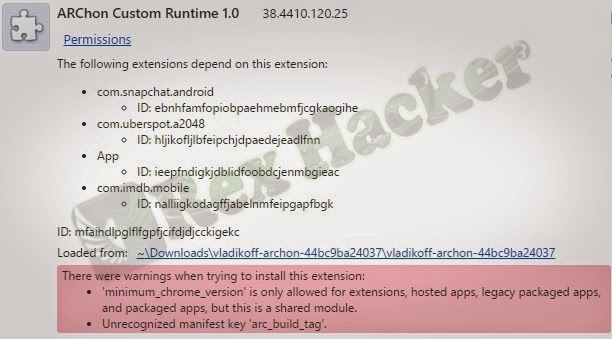
The ARChon runtime will now be running as an extension in Chrome. You may see a couple warnings like the following on the extensions page. However, these are normal and shouldnt affect your ability to run Android apps.

Next, youll need some Android apps to run. This is a little complicated, since Android APKs are not properly packaged for Chrome. However, with a little elbow grease (or some help from your friendly neighborhood internet), you can get some of them to launch. Whether they function properly is an entirely different matter.
Step 2: Install Existing Android Apps
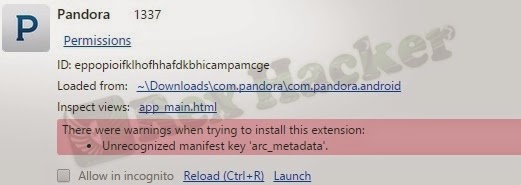
The quickest, most dead-simple way to get some working Android apps is to find some online. Forums like this subreddit are already working on getting some functional. However, this is a far cry from the 1.3 million apps on the Play Store. While most of those will probably remain out of your reach due to incompatibility issues, well also look at how to (try to) create your own.
Disclaimer: Distribution of modified apps is, generally speaking, some degree of copyright violation. In practice, theres little distinction between downloading a pre-modified app, and downloading the regular version and modifying it yourself. For this reason, its unlikely any developer of a free app will be too concerned if you download a pre-modified app to play around with. However, downloading a modified paid app is piracy. Please support developers and dont download modified versions of paid apps without paying for them. And, while it should go without saying, dont write a bad review or criticize the developer if an app is broken in Chrome. Youre on your own here.
Some helpful internet users have created a growing list of apps that work in Chrome. You can find download links in that document, or find more in communities currently working on Chrome APKs. Once you have a .zip file containing one of these modified APKs, heres how to install it:
1. Unzip the file and place the folder (likely named something like "com.twitter.android")
in a place you can easily find.
in a place you can easily find.
2. Open the Extensions page in Chrome.
3. Click "Load unpacked extensions"
4. Select the folder with the modified APK you downloaded.
The app will now appear in your list of Chrome extensions. If youre a particular fan of Chrome apps, you might also notice that a shortcut has been added to the Chrome app launcher. Depending on how it was packaged, it may have a benign Android icon and the package name instead of a proper app name.
Available link for download
Tuesday, January 31, 2017
How to find all your apps and programs in Windows 10 Beginners guide Updated
How to find all your apps and programs in Windows 10 Beginners guide Updated
How to find programs or applications that installed on my system - thats what we gonna
see in this post - Works on Windows 10 Creators Update, Windows 10
Anniversary Update, and other editions of Windows like Windows 10 earlier builds like Aug 2015
and Nov 2015 builds.
In our last post, we had seen how to pin an application to start menu in windows 10. In this post lets see how to find all programs in Windows 10.
There are couple of ways, we can find program list in windows 10.
However, i like to point out only the basic and most easiest ways in windows 10. So, if you are
looking for where i can find the list of programs installed on my system, then i hope this guide is
helpful for you.
How to find all apps in windows 10 - Method 1
1) Press windows (logo) Key
(or) Press start button.
![How to find all your apps and programs in Windows 10 [Beginners guide] [Updated]](https://blogger.googleusercontent.com/img/b/R29vZ2xl/AVvXsEiDIRe8pdNPX-F7BpTVQ1lHDcpYCnhE2YzaHXKhHgw9Gh65CTo9eVTVIaU-wnhaa0es11GXVPRpbqRj2tquzm7vpmdBoatRLyjfsUDPweI6AT4thbysePrd-Zj03CD9aaP7bDzS8mgi96g/s320/show-list-of-programs-installed.gif "How to find all your apps and programs in Windows 10 [Beginners guide] [Updated]`")
2) You will see all the apps installed on your system including the store apps.
How to find all programs in Windows 10 - Method 2
1) Open control panel
[Helpful link : How to Open control panel in Windows 10 in different ways ]
![How to find all your apps and programs in Windows 10 [Beginners guide] [Updated]](https://blogger.googleusercontent.com/img/b/R29vZ2xl/AVvXsEjA9PO38OfNTuyozoQmRKN8pxUqqu1aDJIhntbeUlEUjU-UTCGDgHho470GZG7RgbxA4EfliKsz27E6UwY1Q-PqkoiwVqtkpqK_2dTSlzidxWHHgRizVrICxc4fDhh4HlFE8rxK5MF2fe4/s320/show-list-of-programs-installed.gif "How to find all your apps and programs in Windows 10 [Beginners guide] [Updated]")
How to auto Shutdown your Windows 10 PC at particular time??????
see in this post - Works on Windows 10 Creators Update, Windows 10
Anniversary Update, and other editions of Windows like Windows 10 earlier builds like Aug 2015
and Nov 2015 builds.
In our last post, we had seen how to pin an application to start menu in windows 10. In this post lets see how to find all programs in Windows 10.
There are couple of ways, we can find program list in windows 10.
However, i like to point out only the basic and most easiest ways in windows 10. So, if you are
looking for where i can find the list of programs installed on my system, then i hope this guide is
helpful for you.
How to find all apps in windows 10 - Method 1
1) Press windows (logo) Key
(or) Press start button.
2) You will see all the apps installed on your system including the store apps.
How to find all programs in Windows 10 - Method 2
1) Open control panel
[Helpful link : How to Open control panel in Windows 10 in different ways ]
2) On the top edge you will find the search box, click on it and type Program and features
3) Click on the Show which program is installed on this system which will be available
in the search result under program and features.
There, you will find the list of programs currently installed on your system
Thats it..
Other Postss..
Click to see all Windows 10 basic articles..
Available link for download
Subscribe to:
Posts (Atom)