Showing posts with label where. Show all posts
Showing posts with label where. Show all posts
Friday, February 24, 2017
Where is My computer how to open it and restore on desktop in Windows 10 Updated Beginners guide
Where is My computer how to open it and restore on desktop in Windows 10 Updated Beginners guide
How to open my computer in windows 10 - Thats what we gonna see in this post. If you are new
to windows 10 then the first thing you will notice is my computer icon missing in desktop. You
may think about it like where did my desktop go on windows 10,that was working before upgrade
or clean installation. if you are the one who search my computer then
here is an post that will show you how to put my computer on desktop and how to open my
computer in Windows 10. -Works on Windows 10
Creators Update, Windows 10 Anniversary Update, and other editions of Windows like Windows 10
earlier builds like Aug 2015 and Nov 2015 builds.
Where is my computer in Windows 10 ?
First, i like to tell a important note.. there is no my computer and you will no longer find my
computer in windows 10??
just joking., dont be serious.. you wont see the my computer as it is in Windows 10 because they
had renamed the My computer to This PC in Windows 10. So start saying This PC from now on.
How to open my computer in Windows 10 ?
There are many ways you can open my computer or This PC however here is an easiest way to open
my computer in Windows 10.
1) Press Windows Key
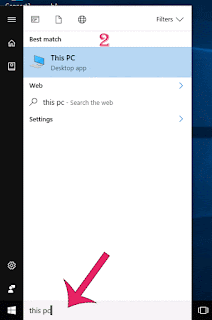
2) Type This PC
3) Select the top most result ( This PC) desktop app
It will open my computer in your PC.
How to get my computer on desktop in windows 10..
We had opened the this PC app, now its time to create shortcut for this PC in desktop
just follow the below steps..
If you wish to create shortcut for my computer to launch on Windows 10, then you are lucky as you
dont need to do some great tasks, all you just need to do is to enable its desktop icon..
if you wish to enable desktop icon for my computer, then simply follow the steps shown in the below
Post.
How to put my computer to desktop [Link]
Thats it..
Using the steps shown in the post, you can pin my computer to desktop or you can put my computer
on any desktop and laptops..
Comment if you have any doubts..
Hope it is helpful.
Are you a beginner ? then here are all posts that deals with mastering basics of Windows 10.
Click to see all the basic tutorials
to windows 10 then the first thing you will notice is my computer icon missing in desktop. You
may think about it like where did my desktop go on windows 10,that was working before upgrade
or clean installation. if you are the one who search my computer then
here is an post that will show you how to put my computer on desktop and how to open my
computer in Windows 10. -Works on Windows 10
Creators Update, Windows 10 Anniversary Update, and other editions of Windows like Windows 10
earlier builds like Aug 2015 and Nov 2015 builds.
Where is my computer in Windows 10 ?
First, i like to tell a important note.. there is no my computer and you will no longer find my
computer in windows 10??
just joking., dont be serious.. you wont see the my computer as it is in Windows 10 because they
had renamed the My computer to This PC in Windows 10. So start saying This PC from now on.
How to open my computer in Windows 10 ?
There are many ways you can open my computer or This PC however here is an easiest way to open
my computer in Windows 10.
1) Press Windows Key
2) Type This PC
3) Select the top most result ( This PC) desktop app
It will open my computer in your PC.
How to get my computer on desktop in windows 10..
We had opened the this PC app, now its time to create shortcut for this PC in desktop
just follow the below steps..
If you wish to create shortcut for my computer to launch on Windows 10, then you are lucky as you
dont need to do some great tasks, all you just need to do is to enable its desktop icon..
if you wish to enable desktop icon for my computer, then simply follow the steps shown in the below
Post.
How to put my computer to desktop [Link]
Thats it..
Using the steps shown in the post, you can pin my computer to desktop or you can put my computer
on any desktop and laptops..
Comment if you have any doubts..
Hope it is helpful.
Are you a beginner ? then here are all posts that deals with mastering basics of Windows 10.
Click to see all the basic tutorials
Available link for download

Friday, January 20, 2017
Where is program files and program data folder in Windows 10 located Solved
Where is program files and program data folder in Windows 10 located Solved
Where is program files and program data folder in Windows 10 located - thats what we gonna
see in this post - Works on Windows 10 Creators Update, Windows 10
Anniversary Update, and other editions of Windows like Windows 10 earlier builds like Aug 2015
and Nov 2015 builds.
Recently, one of our reader have difficulty in finding the program files and program data located,
that happened when he tried to uninstall the application and as usual it leaved some remains. He
wished to clear those remains, he knows that those files are stored in program files but he dont know
where it is located ..So,in this post i like to share those steps which may be helpful if you are the one
who doesnt know how to access program files in windows 10 or where is windows 10 program files
folder located or some other thing then i hope this may be helpful for you..
Please note : The program filess location is same for both x64 bit version of windows 10 and x86 bit
version of windows so, dont get confused like how to get to program files x86 on windows 10
or how to get to program files x64 on windows 10. They are all same.
Just follow the steps below..
1) The first step in finding program files location is the most needed thing.
We need to find the directory where windows was installed.
How to find the windows installed location (or)
where is windows installed on my computer?
So, first press Windows (logo) key + E Keys on your Keyboard
2) This will open This PC ( the new name of My computer)
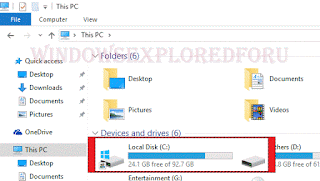
3) On that you will see various drives like local disk c, local disk d,etc..,(unless you changed the drive names)
4) Find which drive has Windows logo in it..(see the above pic)
5) The drive which has windows logo in it is our windows installed location.
6) Double click or single click it to open.
7) When you opened,you can your find the Program files..
Thats it...
Where is program data folder located in Windows 10 ..?
Program data folder is located on the same windows installed drive.. But the program data folder is
hidden by default.. you need to unhide the folders to view it..
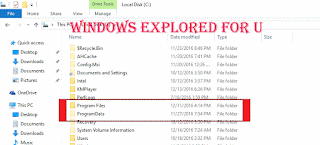 I had shown how to unhide the folders in Windows 10 in this article [Link], this also follows the
same procedure.. when you unhide the folder visit again the windows installed drive, you will find
program data folder now..
Thats it..
Hope it is helpful.
see in this post - Works on Windows 10 Creators Update, Windows 10
Anniversary Update, and other editions of Windows like Windows 10 earlier builds like Aug 2015
and Nov 2015 builds.
Recently, one of our reader have difficulty in finding the program files and program data located,
that happened when he tried to uninstall the application and as usual it leaved some remains. He
wished to clear those remains, he knows that those files are stored in program files but he dont know
where it is located ..So,in this post i like to share those steps which may be helpful if you are the one
who doesnt know how to access program files in windows 10 or where is windows 10 program files
folder located or some other thing then i hope this may be helpful for you..
Please note : The program filess location is same for both x64 bit version of windows 10 and x86 bit
version of windows so, dont get confused like how to get to program files x86 on windows 10
or how to get to program files x64 on windows 10. They are all same.
Just follow the steps below..
1) The first step in finding program files location is the most needed thing.
We need to find the directory where windows was installed.
How to find the windows installed location (or)
where is windows installed on my computer?
So, first press Windows (logo) key + E Keys on your Keyboard
2) This will open This PC ( the new name of My computer)
[The windows installed location]
3) On that you will see various drives like local disk c, local disk d,etc..,(unless you changed the drive names)
4) Find which drive has Windows logo in it..(see the above pic)
5) The drive which has windows logo in it is our windows installed location.
6) Double click or single click it to open.
7) When you opened,you can your find the Program files..
Thats it...
Where is program data folder located in Windows 10 ..?
Program data folder is located on the same windows installed drive.. But the program data folder is
hidden by default.. you need to unhide the folders to view it..
same procedure.. when you unhide the folder visit again the windows installed drive, you will find
program data folder now..
Thats it..
Hope it is helpful.
Click to see all Windows 10 basic articles..
Available link for download
Subscribe to:
Posts (Atom)